AI evaluation: answer copies checked, ticked and marked in minutes — not weekends.
Vacademy's AI evaluation reads a student's answer copy — a scanned handwritten PDF or a typed online attempt — grades every question against your marking scheme and model answers, and returns the copy with ticks, marks and short notes written on it, the way a teacher's red pen would. Teachers review and release; students see a checked copy, not a bare score.
- Handwritten PDF scans and typed answers · any subject
- Ticks, marks and notes drawn on the copy
- 200 copies per upload · names read off the sheet
- Priced per page of the copy · teacher always in control
Why teams switch
The status quo is costing your team time and money
Checking copies eats the week after every test
A batch of 120 students writing a 5-page periodic test is 600 pages. At 12–15 minutes per copy, that is 25–30 teacher-hours before a single result goes out. Sunday goes to the red pen.
Most auto-grading stops at typed MCQs
Board-pattern exams, subjective papers and numericals with working are written by hand on paper. That is exactly the work that stays manual with a typical LMS.
Marking drifts between teachers and between Monday and Friday
Two teachers give the same answer different marks. The same teacher marks softer at copy 90 than at copy 9. Students notice, parents compare, and re-check requests pile up.
Inside the evaluation
Per-question scoring against your scheme, with a note and a confidence on every mark
The AI scores each question against the marking scheme and model answer, writes a one-line reason, and flags low-confidence marks for the teacher to look at first — before anything is released.
Lexical Resource flagged for review (67% confidence). AI scored 6. Suggested action: confirm or override before publish.
How AI evaluation works
Upload → read → grade → checked copy → review → release
The copy goes in as a PDF scan (or a typed attempt) and comes back with the marking on it. Nothing is published until a teacher releases it.
Upload the copies
One student's copy from the submissions list, or a whole pile with Bulk AI check (up to 200 PDFs per upload). Students can also upload their own copy from the app for manual-upload exams. Typed online attempts need no upload at all.
The AI reads the handwriting
Every page is scanned for layout, then read by a vision model that handles cursive, corrections and margin work. For bulk uploads it also reads the name and roll number written at the top and matches the copy to the right student. It never guesses — a doubtful match waits for a person.
Every question is graded against your scheme
Marks per question come from the assessment's marking scheme and model answers. Criteria are generated once for the paper and reused for every copy, so all students are judged the same way. Partial marks, step marks and unattempted questions are handled, with a short note on each score.
The checked copy comes back
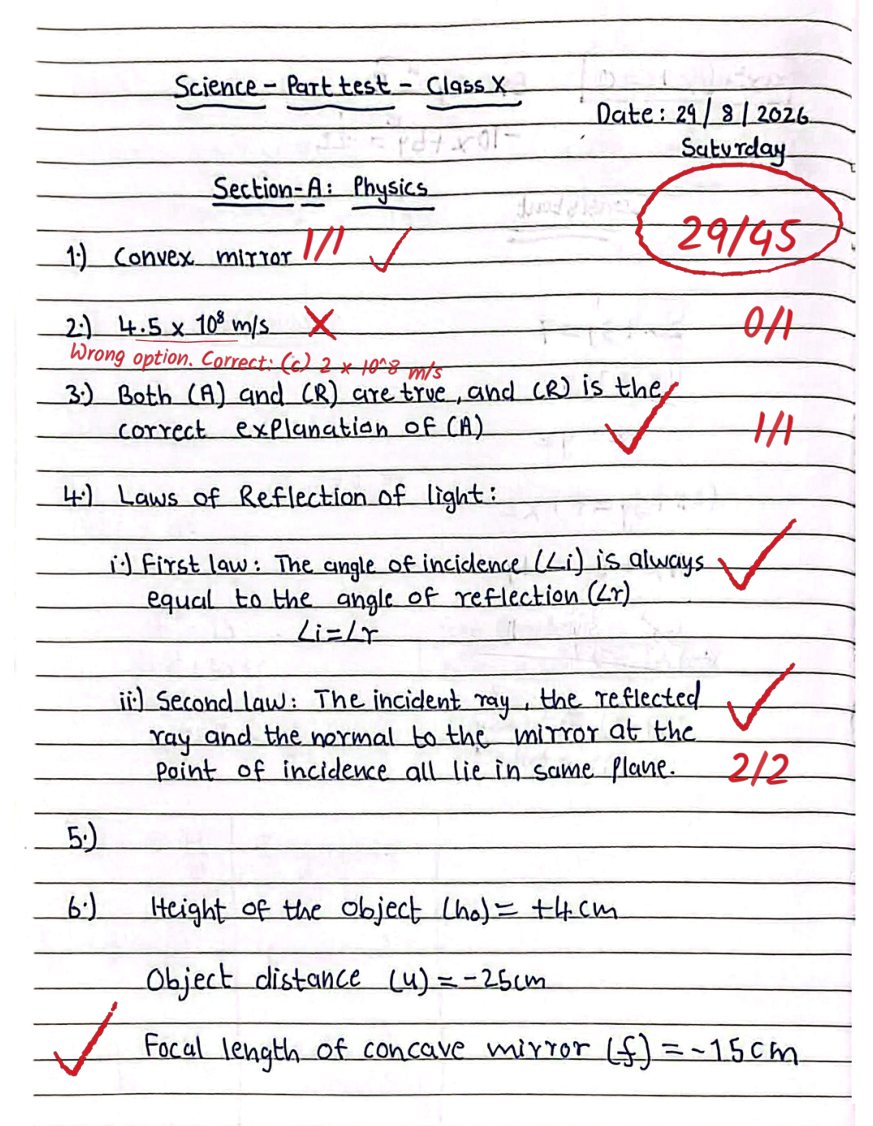
Ticks and crosses next to the answers, marks in the margin as 2/3, a short note where marks were lost, and the total on page one — drawn on the student's own pages. Teachers can open the copy in the marking tool and change any mark.
Teacher reviews, then releases
Per-question marks and notes sit on a review page. Override anything; the AI never overwrites a teacher's edit. Results reach students only when the assessment's release rule says so.
What's inside
Built for paper exams as much as online ones
Handwritten answer sheets
Reads scanned PDFs of pen-and-paper answers — long answers, numericals with working, labelled diagrams, notes in the margin. No special OMR sheet or template needed.
Marks written on the copy
The student gets back their own copy with ticks, marks per question and short notes, plus the total on the first page. It reads like a teacher checked it, because the marking follows the page.
Bulk AI check for a whole batch
Drop up to 200 copies at once. The AI reads each student's name and roll number from the top of the sheet and matches it to your batch. Copies with two possible students, or no readable name, are shown to you with suggestions — never assigned by guesswork.
One marking scheme, every copy
Marking criteria are generated once per question paper and stored. Every copy is graded against the same criteria and your model answers, so there is no drift between copies or between teachers.
Typed answers, numericals and code too
Online attempts are evaluated the same way: subjective answers against the scheme, numeric answers accepting equivalent forms (1/2 = 0.5 = 50%), and coding answers run against your test cases.
Teacher in control, priced per page
Stop a check while it runs, change any mark on the review page, edit marks on the copy itself, release when you choose. Evaluation is priced per page of the copy from your institute's credit balance; the exact cost is shown before you start, and a failed or stopped check is not charged. Ask us for the rate for your batch size.
What changes after the first test
The arithmetic of a 120-student periodic test
Measured on a Class 10 science periodic test, 21 questions, evaluated end to end by the AI.
One drag-and-drop for the whole batch; the student's name and roll number are read off each sheet.
Runs three copies at a time in the background; you get an email and an alert when the batch is done.
Every result waits for the assessment's release rule. The AI never overwrites a teacher's edit.
Connected to the platform
The checked copy is the start of the result, not the end of the work
Marks land on the student's attempt like any other evaluation, so reports, release rules, parent communication and workflows pick them up without a spreadsheet in between.
Turn on AI evaluation on submit for an assessment: every copy a student submits is queued for evaluation automatically.
Get an email, a bell alert and an on-screen notice when a bulk batch finishes — with how many copies need a human decision.
Trigger an automation when a batch completes (send results to the class group, notify the coordinator, open a re-check window).
Results follow the assessment's release rule — after submission, after the exam window closes, or held until a teacher releases.
Built for every team
Who uses AI evaluation
Coaching centers (JEE, NEET, boards, state exams)
- Weekly tests evaluated the same evening, results in the app before the next class
- Same marking for every student in a 300-student batch
- Teachers spend the saved hours on doubt sessions, not the red pen
Schools (CBSE, ICSE, state boards)
- Periodic tests and pre-boards evaluated with the school's own marking scheme
- Checked copies go to parents as PDFs — the marks are visible on the page
- Subject heads see where the class lost marks, question by question
Universities and training institutes
- Bulk-evaluate 200 internal-assessment copies in one upload
- Evaluators review only the questions the AI marked low-confidence
- An audit trail of who evaluated, who edited, who released
Evaluation, three ways
Manual checking vs typed-only auto-grading vs Vacademy AI evaluation
Where each approach works, in the terms an academic head decides on: what kind of paper it handles, how long it takes, and what the student gets back.
| Manual checking | Typed-only auto-grading | Vacademy AI evaluation | |
|---|---|---|---|
| Handwritten paper exams | Yes | No — answers must be typed | Yes — scanned PDF of the copy |
| Subjective / long answers | Yes | Only with typed answers | Yes — graded against your marking scheme |
| Time per 5-page copy | 12–15 min of a teacher | Instant | 3–5 min, in the background |
| What the student gets back | Ticked copy (if returned at all) | A score | The same copy with ticks, marks and notes |
| Consistency across copies | Varies by teacher and fatigue | Exact | Same criteria for every copy |
| Whole batch at once | No | Yes | Yes — 200 copies per upload, names read off the sheet |
| Teacher can change a mark | Yes | Usually re-keying | Yes — on the review page or on the copy itself |
| Cost per copy | Teacher time | Included | Per page of the copy, from a credit balance — ask for a quote |
From a pilot
Class 10 science periodic test, coaching center in Madhya Pradesh
“A five-page copy with 21 questions was evaluated in one go: the copy came back with a tick or cross beside every answer, marks like 2/3 in the margin, a one-line note where marks were lost, and 29/45 circled on the first page. The teacher changed one mark on the review page and released the batch.”
— September 2026 pilot
Frequently asked
Common questions from buyers
What is AI evaluation on Vacademy?+−
AI evaluation grades a student's answer copy the way a teacher would: it reads the copy (a scanned handwritten PDF or a typed online attempt), marks every question against the assessment's marking scheme and model answers, and writes ticks, marks and short notes on the copy itself. Teachers and schools call it AI copy checking, AI answer sheet checking, AI grading or AI assessment evaluation — on Vacademy it is one feature, AI evaluation. The teacher reviews the marks and decides when students see them.
Is AI evaluation the same as AI assessment or AI copy checking?+−
Yes. AI assessment, AI copy checking, AI answer sheet checking and AI grading are different names for the same Vacademy feature: AI evaluation. The assessment is the test you set up — MCQ, subjective, or an offline exam whose copies are uploaded as PDFs. AI evaluation is the step that checks those copies against your marking scheme and returns them with ticks, marks and notes. Whatever you call it, it is one switch on the assessment, one credit balance, and one review screen for the teacher.
Can AI evaluation check handwritten answer sheets?+−
Yes. Vacademy reads scanned PDF copies with a vision model that handles ordinary student handwriting, crossed-out work and margin notes. Very faint pencil or a badly skewed scan can lower the read quality; when the AI cannot read a copy well enough it says so instead of guessing, and the copy is flagged for a teacher.
How accurate is AI evaluation compared to a teacher?+−
Every copy is graded against the same marking scheme and model answers, so the AI is at least as consistent as a teacher across a batch. It marks conservatively: partial credit follows the scheme, and a question the AI is not confident about is shown to the teacher with the AI's note. The teacher can change any mark, and nothing is published until they release it. In our Class 10 science pilot, a 21-question copy needed one teacher correction.
How much does AI evaluation cost?+−
It is priced per page of the copy and paid from your institute's Vacademy credit balance, so a short test costs less than a long paper and you never pay per teacher seat. The exact credit cost is shown before you start a check, and a check that fails or is stopped is not charged. Rates depend on your batch size and how many tests you run — book a demo and we will quote for your institute.
How long does it take?+−
A 5-page copy takes about 3 to 5 minutes end to end. Bulk uploads run three copies at a time in the background, so 100 copies finish in roughly 2 to 3 hours; you receive an email and an alert when the batch is done, and you can keep working — or log out — in the meantime.
Which subjects and question types does it handle?+−
Any subject written on paper or typed online: long and short answers, numericals with working, one-word and fill-in-the-blank answers, labelled diagrams, and objective questions on the same paper. Numeric answers accept equivalent forms, low-confidence maths lines get a second read from a maths-specific recognizer, and coding answers are run against your test cases.
Can I upload all the copies of a batch at once?+−
Yes — Bulk AI check takes up to 200 PDF copies per upload. The AI reads the student's name and roll number from the top of each sheet and matches it to the students of that assessment. A copy where two students fit equally, or where no name can be read, is shown to you with suggested students; you pick, and it is evaluated right after. No copy is ever put on the wrong student's record by a guess.
Does the teacher stay in control?+−
Always. The teacher can stop a check while it runs, change any mark or note on the review page, open the checked copy in the marking tool and edit the marks on the page, and decide when results are released. The AI never overwrites a mark a teacher has edited.
Does it work for CBSE, state boards and coaching tests?+−
Yes. The AI grades against your own marking scheme and model answers, so it follows the board's step-marking pattern you already use. It is used for periodic tests, pre-boards, weekly coaching tests and internal assessments. Copies are read in English today; ask us about other languages.
Is student data safe?+−
Copies stay on your Vacademy institute account and are processed on Vacademy's own servers and AI providers under our data-processing terms. Only the pages being graded are sent to the model, results are stored against the student's attempt like any other evaluation, and every check, edit and release is recorded in the activity log with the name of the person who did it.
Explore the platform
Pairs well with
Online Exams & Assessments
Timed exams, mocks, practice tests and surveys the evaluated copies belong to.
Read more →Manual-Upload Exams
Students download the paper, write by hand, upload a photo or PDF of the copy.
Read more →Coding Challenges & In-Browser IDE
Code answers run against test cases, with plagiarism detection.
Read more →Try it on your own copies
Send us ten scanned copies and your marking scheme — we will evaluate them in front of you.
A 30-minute session: we upload your copies, you watch the checked PDFs come back with ticks and marks, and we walk through the review page and the release rule. No setup on your side.