Key takeaways
- NTA's web mock and the console used in the JEE Advanced and GATE practice tests look different, from the clock to the buttons.
- NTA's bulletin describes the rules in words. Its clock is in minutes, as on the console, not hours.
- We found no public picture of the 2026 exam-day screen. Ask your students who sat it.
- Vacademy's JEE Main style offers both layouts, chosen per test. Practice on both before January.
A student in Bhopal practices on NTA’s mock test for two months. She knows exactly where the Back button is. Then, on exam day, she looks for it and cannot find it.
Could that happen? We do not know for sure, and nobody outside the exam hall does either. What we do know is that the two screens JEE teachers talk about look quite different. If your mocks use only one, your students meet the other for the first time with the clock running.
Two screens, one exam
The first is NTA’s own practice test. On NTA’s mock test page, a student picks JEE-Main and a paper and clicks Start Mock Test. NTA says the mock is there to help students understand the processes of a computer-based test, for practice only.
The second is the console used by other exams, such as the official JEE Advanced 2026 practice test and the GATE 2026 mock tests. Both run on TCS iON’s test console, so we call this the TCS console layout. We do not reproduce either official screen here. Below are Vacademy’s two JEE Main-style layouts, built to match them.
Vacademy screens
Same question, two layouts
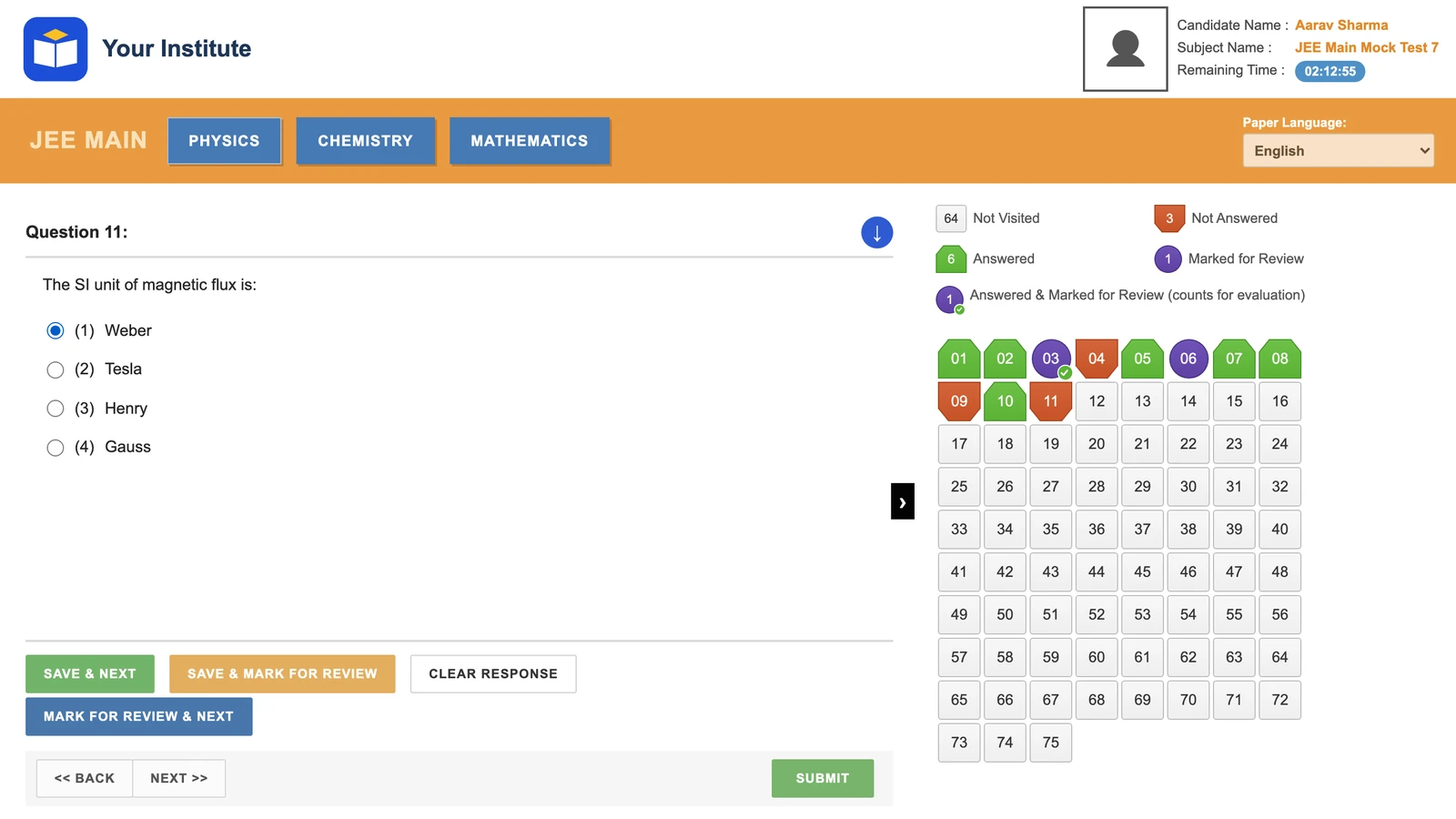
NTA mock layout
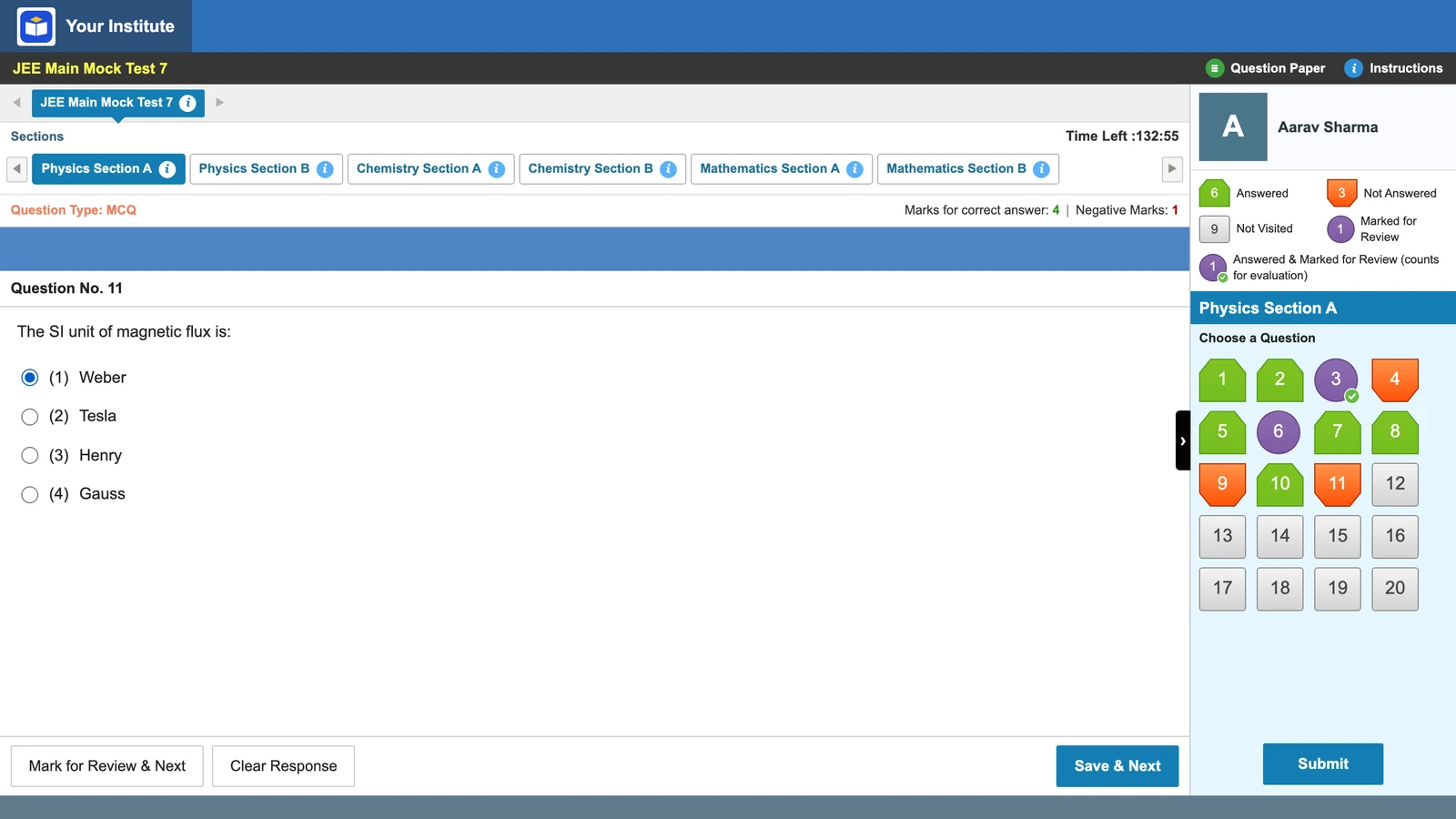
TCS console layout
Seven differences that change how students work
Some of these are about looks. Most change what a student’s hand does under pressure.
| What | NTA mock layout | TCS console layout |
|---|---|---|
| Moving back | << BACK and NEXT >> buttons | No Back button. Students go back through the palette |
| Buttons | Four: Save & Next, Save & Mark for Review, Clear Response, Mark for Review & Next | Three: Mark for Review & Next, Clear Response, Save & Next |
| Clock | Remaining Time in hours, minutes and seconds (02:12:55) | Time Left in total minutes (132:55) |
| Palette | All 75 questions in one grid, 8 to a row | Only the open section (20 or 5 questions), 4 to a row |
| Subject tabs | Three subject buttons on an orange band | Six section tabs, such as Physics Section A and Physics Section B |
| Submit | In the bottom strip, next to Back and Next | Under the palette, on the right |
| Marks shown | No marks row | Question type and marks (+4, -1) above each question |
As built in Vacademy’s two JEE Main-style layouts, which follow NTA’s web mock and the console.
The first three matter most. A student who uses Back on every question needs a new habit on the console: the palette. A student used to 02:12:55 has to do sums with 132:55. And the extra Save & Mark for Review button does not exist on the console. On both, the five palette states and the Save & Next rule are the same.
What NTA’s bulletin says, and what it does not
The JEE (Main) 2027 Information Bulletin describes the exam screen in Appendix III, its CBT guidelines. It gives rules in words, not a screenshot you can copy.
The countdown timer at the top right shows the time remaining, in minutes. At zero the exam ends by itself.Appendix III, Para 19 (summarized)
Clicking a number in the palette does NOT save the current answer. Save & Next saves it. Mark for Review & Next saves it and marks it.Appendix III, Para 8 (summarized)
Sections are shown on the top bar, and the one being viewed is highlighted.Appendix III, Para 12 (summarized)
A clock in minutes points to the console. But the appendix never mentions a Back button, a Save & Mark for Review button or a Submit button, either way. It does not name the software company. And we found no public picture of the 2026 exam-day screen. So we will not tell you which one your students will see.
Ask your 2026 students which screen they saw
Your best evidence is already in your institute: last year’s students who sat the January or April 2026 session. Send them three questions on WhatsApp or in a short form.
A 3-question form
Which JEE Main screen did you see?
- 1At the top of the screen, did you see an orange band with three subject buttons, or blue tabs with Section A and Section B?
- 2Was there a Back button under the question?
- 3Did the clock show hours (like 02:12:55) or minutes only (like 132:55)?
Want to show both layouts to your teachers before you decide? We will set up one mock in each.
Practicing both in Vacademy
On the first step of a test, the admin picks an exam interface. Choose JEE Main style, then the NTA mock layout or the TCS console layout. The choice is per test, so one batch can do both in the same week.
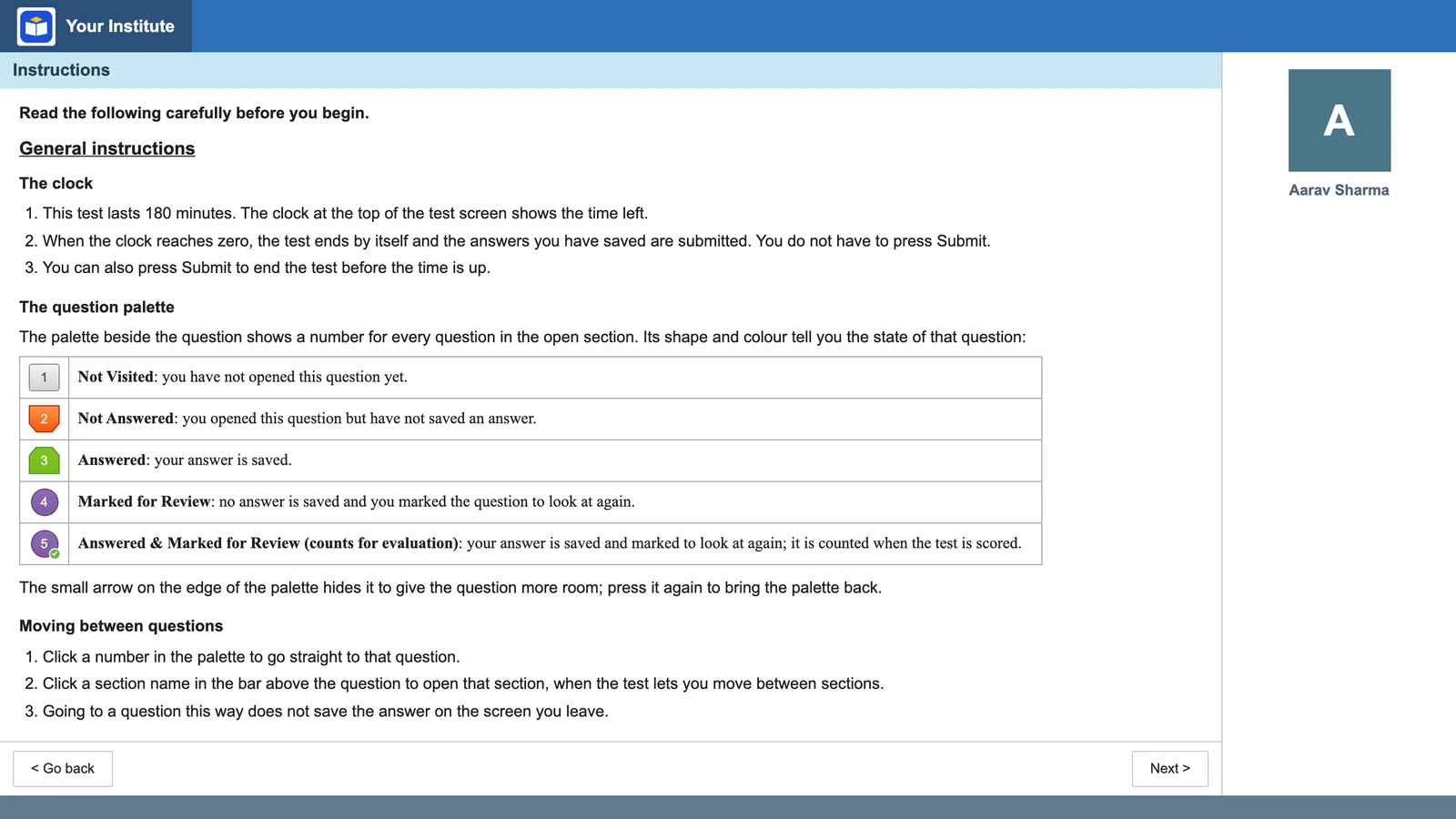
Before the test starts, students see a two-page instructions screen in the same style, written in Vacademy’s own words. Saving is strict by default, so an answer counts only after Save & Next. On a phone, the palette opens as a bottom sheet. To see which students skipped a mock altogether, use student activity tracking.
Vacademy screen
The instructions screen before a TCS console-style test
A suggested split for your mock series
One honest caution: switching layouts too often in the early weeks adds stress for little gain. The rules that cost marks are the same on both. Our JEE Main mock series plan shows where these mocks fit, and topic-wise vs full-syllabus mocks covers what comes before them.
Also see how Vacademy’s other exam-style screens work in exam-style test screens for mock tests.
Questions institutes ask
Is the NTA mock test the same as the real JEE Main exam screen?
Not necessarily. NTA's mock page says the mock is to help students understand the processes of a computer-based test. The bulletin describes a clock in minutes, while the web mock shows hours, minutes and seconds. We found no public picture of the 2026 exam-day screen.
Is there a Back button in the JEE Main exam?
The bulletin's CBT guidelines describe moving by the palette, Save & Next, Mark for Review & Next and the section names on the top bar. They do not mention a Back button. NTA's web mock has Back and Next buttons.
Does the JEE Main timer show hours or minutes?
The bulletin says the countdown timer at the top right shows the time remaining in minutes. NTA's web mock shows a Remaining Time clock in hours, minutes and seconds. Let students practice reading both.
Do students have to click Submit in JEE Main?
No. The bulletin says that when the timer reaches zero, the exam ends by itself and candidates are not required to submit.
Can an institute run both JEE Main screens on Vacademy?
Yes. When the admin picks JEE Main style for a test, they choose the NTA mock layout or the TCS console layout. The choice is per test, so one batch can practice on both.
Does Vacademy's JEE Main-style screen use NTA's logo?
No. The header shows your institute's own logo and name. Vacademy copies the layout and behavior only and is not linked to NTA or any exam body.
Try Vacademy for your JEE Main batch
Run one mock on the NTA mock layout and one on the TCS console layout, and let your students tell you which feels like exam day.