Key takeaways
- In JEE Main, clicking an option does not save it. Only Save & Next or Mark for Review & Next does.
- Click another number in the palette and an unsaved pick is lost. NTA's bulletin says so in plain words.
- Answered & Marked for Review is evaluated. Marked for Review with no answer scores 0.
- Vacademy's exam-style screens copy this rule with strict saving, on by default. Use practice-friendly mode only in week one.
The mark that never counted
A student in Lucknow reaches question 11. She knows it: the SI unit of magnetic flux is the weber. She clicks option 1. Then she remembers a doubt about question 4 and clicks 4 on the palette. She never pressed Save & Next.
On the real exam screen, that answer is gone. Question 11 stays “Not Answered”. Four marks lost on a question she got right.
Vacademy screen · JEE Main style
An option is picked, but the question is still Not Answered
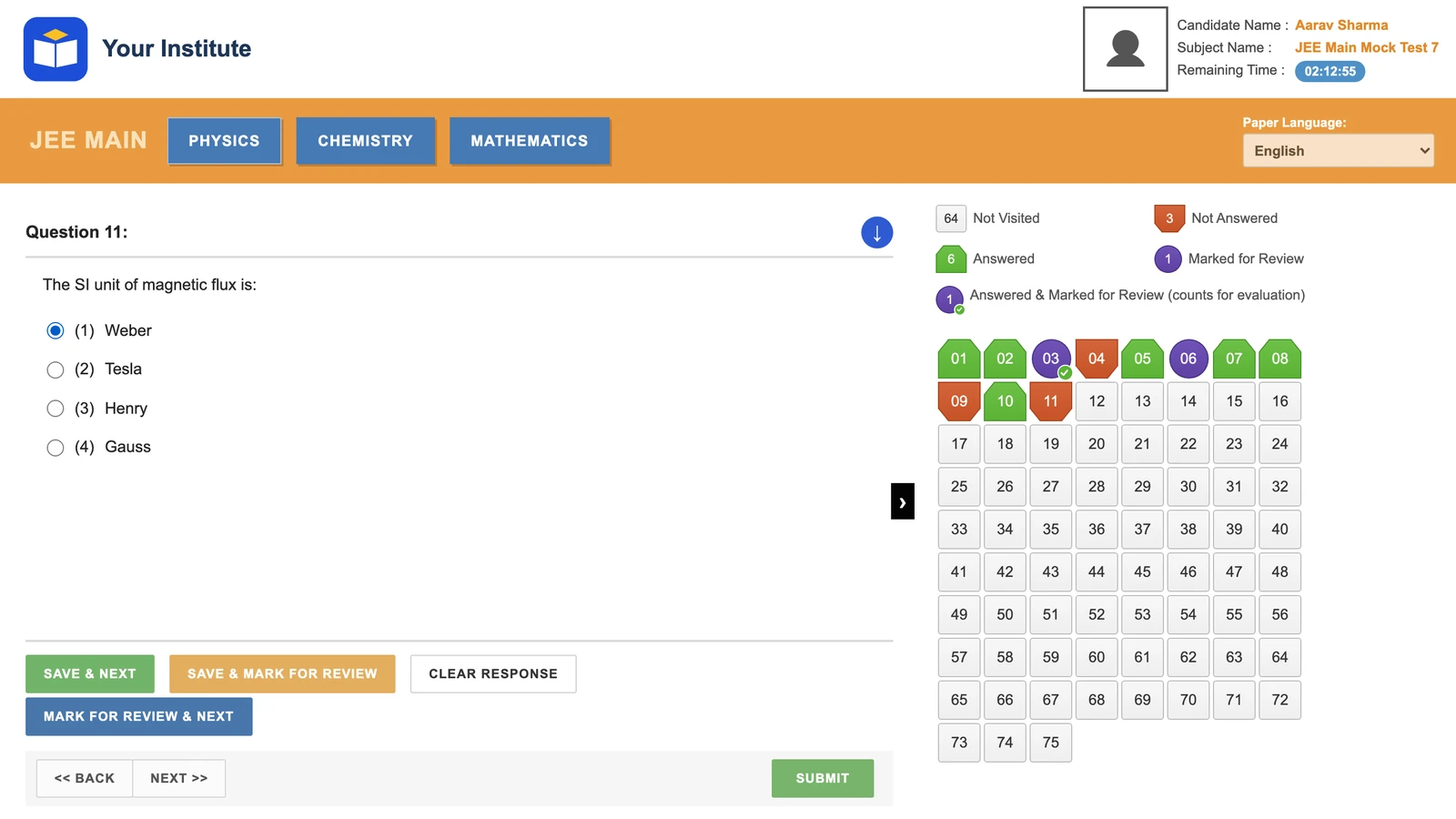
It is an easy slip to make. Students who practice on paper, or on test apps that save every click, carry that habit into the exam hall. The fix is to make mocks behave like the exam.
The five palette states, and what each means for marks
The palette on the right shows each question’s state. These are the five, with the marks from sections 2.4.1 and 2.4.2 of the JEE (Main) 2027 Information Bulletin:
Shapes drawn by us to show the idea. The real palette uses its own images.
Three rules that cost marks
1. A palette jump does not save
“Note that using this option does NOT save your answer to the current question.”Bulletin, Appendix III, para 8(a)
Teach one habit: pick, then Save & Next. Every time.
2. Marked for Review means two different things
With an answer, it is evaluated (para 21). So a wild guess marked “to check later” still risks -1 if time runs out. Without an answer, it scores 0, even when the student knew it. Rule for the batch: mark with an answer only when you would keep that answer.
3. Clear the answer before you change your mind
To drop a risky answer, open the question and click Clear Response, or click the chosen option again (para 9). To change it, clear, pick the new option and Save & Next again (para 11). Picking a new option and then jumping away does not save the new pick.
Section B: typing an integer on the keypad
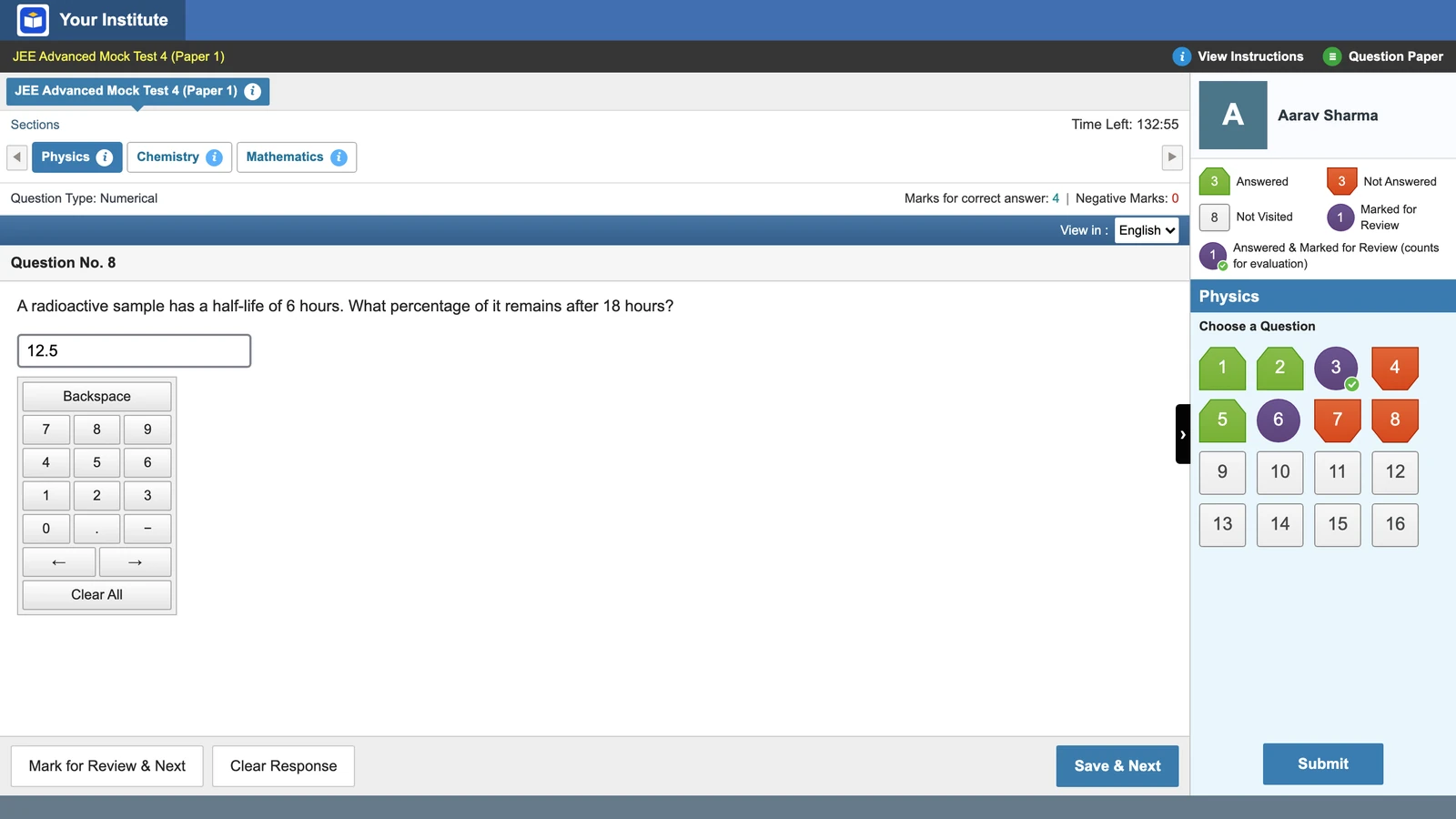
The keyboard is disabled in the exam. Section B answers go in with the mouse on an on-screen keypad below the question (paras 17 and 21b), and the answer is an integer, rounded off to the nearest whole number (section 2.4). The same rule applies here: a typed number counts only after Save & Next.
Vacademy screen
The on-screen keypad for numerical answers
Read the summary before time runs out
In JEE Main, the exam ends by itself when the clock reaches zero (para 19). There is no last chance to check. The bulletin says each section’s summary sits in the legend above the palette (para 15). Train students to look at it with ten minutes left, section by section, and find any Marked for Review with no answer. On Vacademy, Submit also opens a per-section Exam Summary, a good place to teach that check in a mock.
Strict saving in Vacademy
When an admin picks an exam interface, such as JEE Main style, strict saving is on by default. An answer counts only after Save & Next, Mark for Review & Next or Save & Mark for Review. A jump to another question loses an unsaved pick, exactly as in the exam.
Practice-friendly mode saves every click and always allows Submit. Use it on short tests in the first week only, while students learn where things are. Run every full mock with strict saving: after week one, practice-friendly mode trains the wrong habit.
See strict saving on a JEE Main-style mock, using a few of your own questions.
A first-week drill for your batch
Two short tests, then a full mock. Set all three as mock tests: a student can start any time, but once started, the clock is locked.
| When | Test | What students do |
|---|---|---|
| Day 1 | 10 MCQs, 20 minutes, practice-friendly mode | Answer 6, mark 2 with an answer, mark 2 without. Then match the Exam Summary to the plan. |
| Day 3 | 15 questions, 25 minutes, strict saving | Move only by the palette at least five times. Note each answer on rough paper. Compare with the report. |
| Day 6 | Full 75-question mock, 180 minutes, strict saving | In the review class, count answers on rough paper that never reached the report. That gap is the lesson. |
The report shows each student’s correct, wrong and skipped answers and the time spent on every question. A student who skipped many questions they wrote on rough paper is losing saves. More on reading reports in detecting learning gaps earlier and how AI can improve exam prep. Where this drill sits in the season is in our JEE Main mock series plan, and topic-wise vs full-syllabus mocks covers the tests before it.
One limit to be honest about: a drill builds the habit, but nerves still cause slips. Expect a few lost saves in the first strict mock. That is the point of finding them now.
Questions institutes ask
Is an answer saved in JEE Main if I click another question number?
No. The bulletin says that clicking a question number in the palette does NOT save the answer to the current question. Only Save & Next, or Mark for Review & Next, saves it.
Are 'Answered and Marked for Review' questions evaluated in JEE Main?
Yes. The bulletin says a question that is answered and marked for review will be considered for evaluation, so it can earn +4 or lose 1 mark.
Does 'Marked for Review' without an answer get any marks?
No. A question marked for review without an answer is not evaluated and scores 0, even if the student knew the answer.
How do I change a saved answer in JEE Main?
Open the question from the palette, click Clear Response or pick a new option, and click Save & Next again. Clicking the chosen option a second time also deselects it.
How are Section B numerical answers entered in JEE Main?
With the mouse, on an on-screen numeric keypad shown below the question, because the keyboard is disabled. The answer is an integer, rounded off to the nearest whole number.
Can a mock test copy the JEE Main Save & Next rule?
Yes. On Vacademy's exam-style screens, strict saving is on by default: an answer counts only after Save & Next or Mark for Review & Next, and a palette jump loses an unsaved pick.
Try Vacademy for your JEE Main batch
Run this week’s drill on a JEE Main-style screen with strict saving, then compare each student’s rough paper with the skipped questions in the report.