Key takeaways
- JEE Main 2027 Session 1 is on 20-24 and 28 January 2027. From mid-November that is about nine weeks.
- The paper: 75 questions, 300 marks, 180 minutes, +4 and -1 in both sections, no calculator.
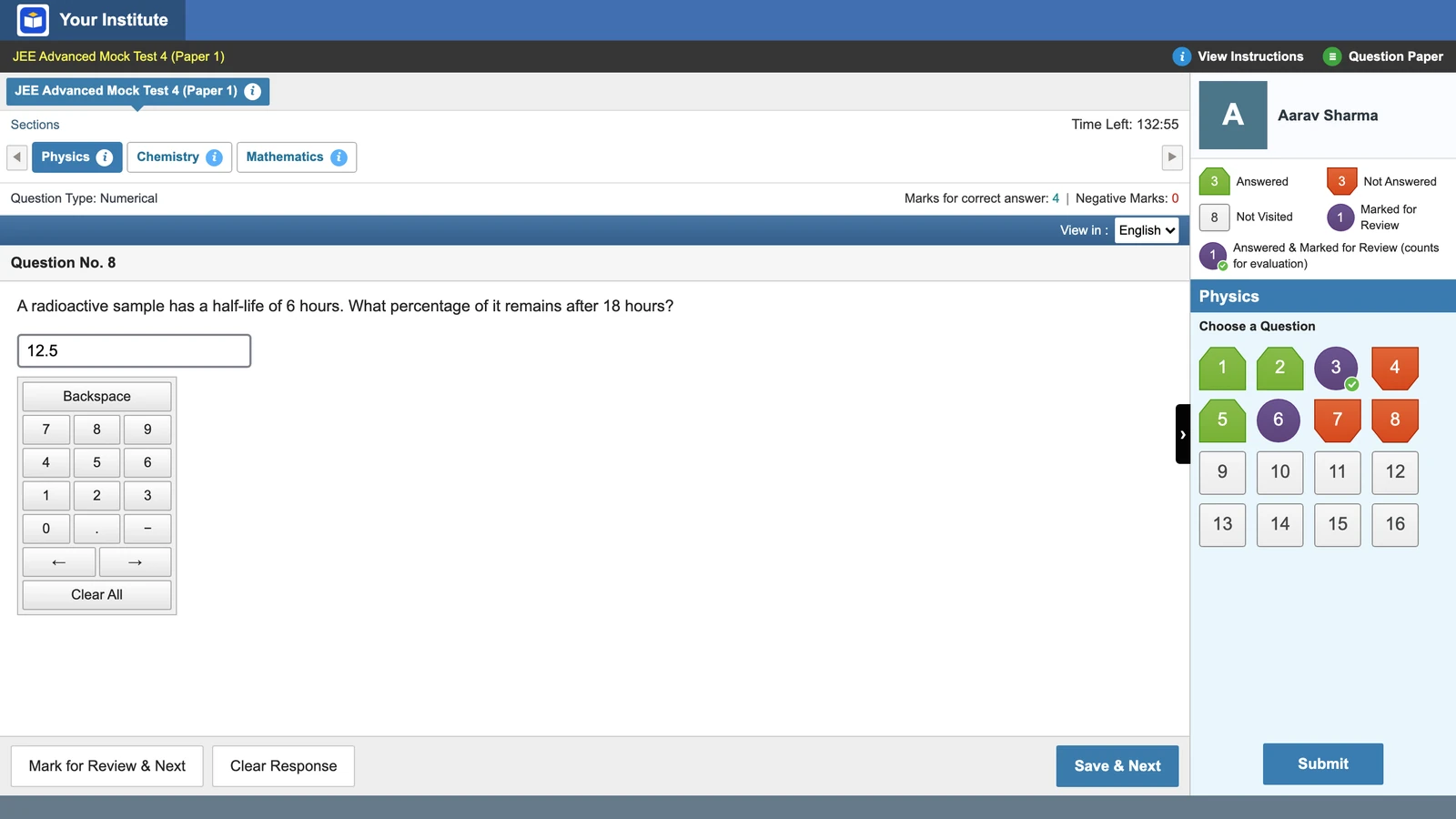
- Section B answers are integers typed on an on-screen keypad with the mouse. Your mocks should do the same.
- On Vacademy, pick the JEE Main style for a test, with the NTA mock layout or the TCS console layout.
- Read rank and percentile as a place in your own batch, never as an all-India rank.
Mid-November at an online JEE batch run out of Kota. The syllabus is nearly done. The question for the academic head is simple: how many full mocks fit before the exam, and on what screen?
NTA has answered the first half. Its public notice of 24 October 2026 puts JEE Main 2027 Session 1 on 20, 21, 22, 23, 24 and 28 January 2027. Session 2 follows on 2 to 7 April, per the 2027 Information Bulletin. Here is the rest.
Count back from 20 January
From 16 November to 19 January there are about nine weeks. Multiply the weeks left by the mocks you can run each week, and leave a review day after each mock. A mock nobody reviews is only a timed worksheet.
A suggested calendar
About 19 full mocks before Session 1
| Dates | Length | What to run | Full mocks |
|---|---|---|---|
| 16 to 29 Nov | 2 weeks | 1 full mock a week, strict saving. In week one, a short practice-friendly test first. Chapter tests on the other days. | 2 |
| 30 Nov to 27 Dec | 4 weeks | 2 full mocks a week, strict saving. One review class after each. | 8 |
| 28 Dec to 17 Jan | 3 weeks | 3 full mocks a week, at 9 AM or 3 PM, the real shift times. Admit cards come out on 13 Jan. | 9 |
| 18 to 19 Jan | 2 days | No new mock. Revise mistakes from the last three papers. | 0 |
| Total before 20 January 2027 | 19 | ||
One honest limit: nineteen mocks suit a batch that has finished the syllabus. A Class 12 batch still finishing Organic Chemistry may manage half, and that is fine.
What the JEE Main 2027 paper looks like
Build every full mock to the pattern in section 2.4 of the JEE (Main) 2027 Information Bulletin. It has not changed from the revised 2026 bulletin.
Paper 1 (B.E./B.Tech)
75 questions · 300 marks · 180 minutes
| Subject | Section A | Section B | Marks |
|---|---|---|---|
| Mathematics | 20 MCQs | 5 numerical | 100 |
| Physics | 20 MCQs | 5 numerical | 100 |
| Chemistry | 20 MCQs | 5 numerical | 100 |
- +4 for right, -1 for wrong, in both sections
- 0 for unanswered or marked for review without an answer
- Section B: an integer, rounded off, typed on a keypad
- No calculator. Rough work on paper sheets only
Two lines matter most for mocks. Section B is typed with the mouse on an “on-screen virtual numeric keypad”, because the keyboard is disabled. And there is no calculator. The 2027 bulletin lists calculators among items not allowed, and NTA’s notice of 2 November 2025, about the 2026 exam, said they are not permitted “in any form”.
Vacademy screen
Numerical answers go in through an on-screen keypad
Chapter tests first, full mocks later
Do not start with full papers. A student who has not finished Rotational Motion learns nothing from a 300-mark score except fear. Run chapter and part-syllabus tests until the syllabus closes, then switch. We explain the split in topic-wise vs full-syllabus mock tests.
Building the paper in Vacademy
Most institutes already have last year’s papers as Word or PDF files. Upload one and Vacademy pulls out the questions, the options and the answer keys, if the file has them. To fill gaps, the AI question generator writes questions from a chapter or a topic, and teachers can edit or regenerate any of them.
Make six sections: Physics Section A and B, Chemistry Section A and B, Mathematics Section A and B. Use single-correct MCQs in Section A and numerical questions in Section B, and set each question’s marks to match JEE Main (+4, -1). Then set the test type to Mock. A student can start a mock at any time, but once started, the 180 minutes are locked.
Send us one old JEE Main paper. We will turn it into a six-section mock on the JEE Main-style screen and show your teachers the report.
Choosing the screen: NTA mock layout or TCS console layout
On the first step of a test, the admin picks an exam interface. Choose JEE Main style, then one of two layouts: the NTA mock layout, like the practice test on NTA’s website, or the TCS console layout, with six section tabs and a “Time Left” clock in minutes.
Vacademy screen
JEE Main style, NTA mock layout
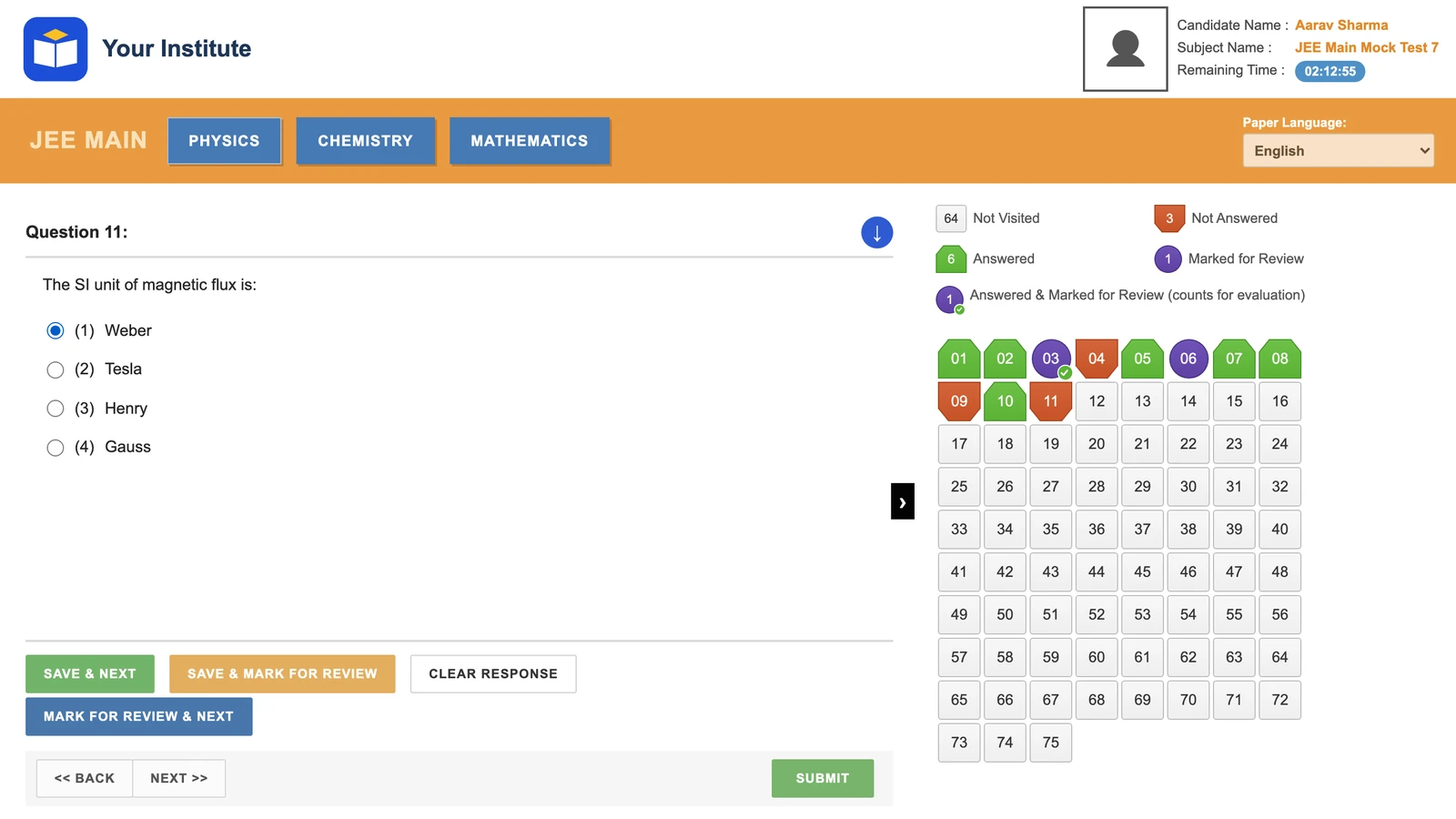
We found no public picture of the 2026 exam-day screen, so we suggest offering both. The full comparison is in NTA mock or TCS console.
Strict saving for every full mock
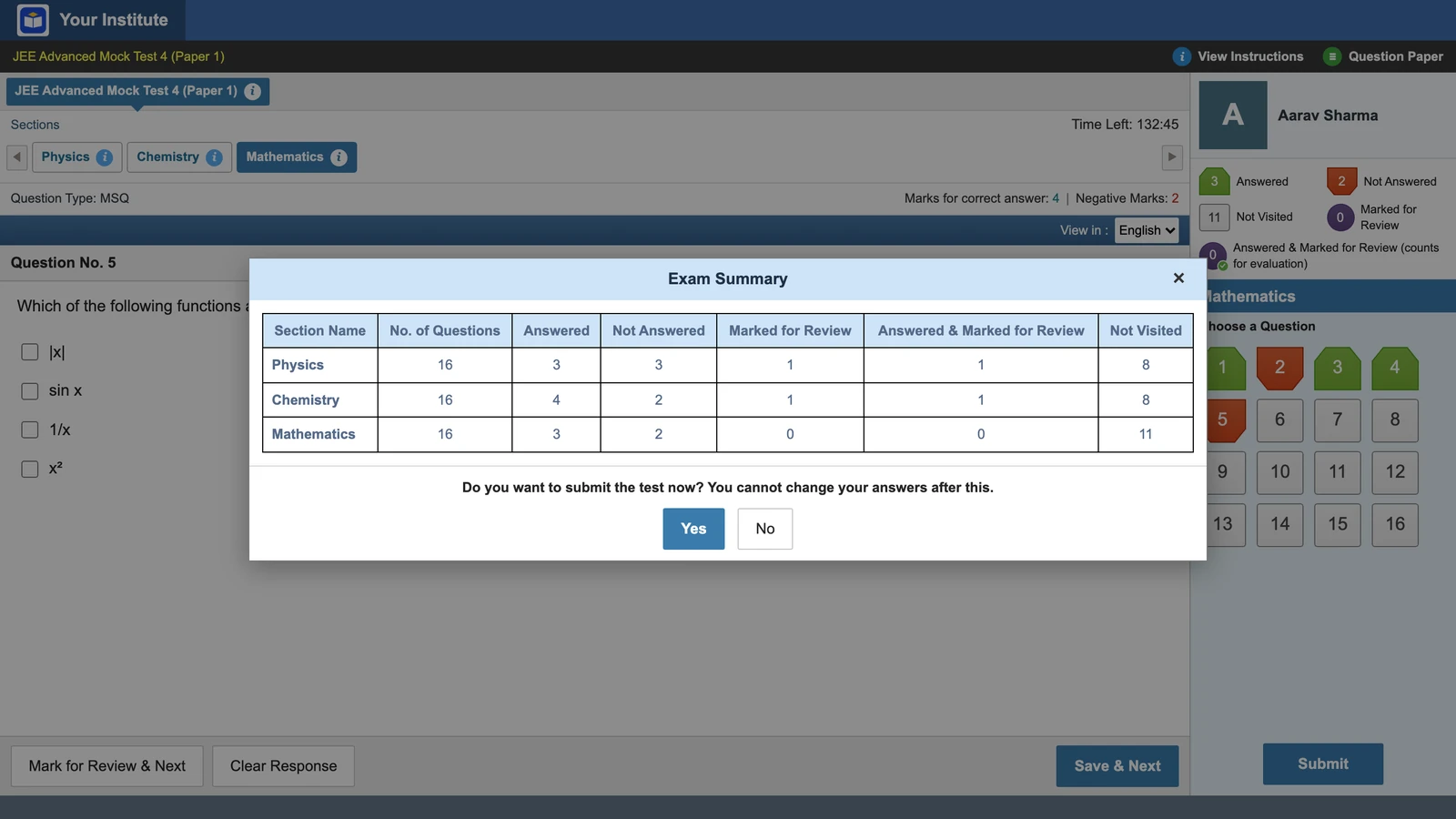
In the real exam, clicking an option does not save it. The answer counts only after Save & Next or Mark for Review & Next. Jump to another question from the palette and the pick is lost.
Vacademy’s strict saving works the same way, and it is on by default. In week one only, run a short test in practice-friendly mode. It saves every click and always allows Submit, so students learn the screen before it costs them marks. Every full mock runs with strict saving. The rules and a first-week drill are in Save & Next and Mark for Review.
Vacademy screen
The Exam Summary before Submit
After the mock: what to read in the report
The report can be ready the moment a student submits, for each student and the whole batch. Four parts are worth a review class:
The full path from question bank to rank report is in our JEE and NEET assessment workflow.
6 signs your JEE Main mock series is not ready
- Your full mocks are still printed, or typed answers come in on WhatsApp.
- Section B answers are picked from four options instead of typed as a number.
- Students can use a calculator during the mock.
- The test does not lock the 180 minutes once a student starts.
- Clicking an option saves it, so students never learn Save & Next.
- Results show marks only, with no time per question or rank in the batch.
Two or more of these? There is still time to fix them before January.
Questions institutes ask
When should coaching institutes start JEE Main full mock tests?
Start full 180-minute mocks once the syllabus is done, ideally two months or more before the session. JEE Main 2027 Session 1 is on 20-24 and 28 January 2027, so from mid-November there are about nine weeks: start now. Before that, use chapter and part-syllabus tests.
How many JEE Main mock tests should a student take before the exam?
NTA does not set a number. A workable plan from mid-November is one full mock a week at first, then two, then three in the last three weeks. That comes to about 19 full mocks before 20 January, each with a review day.
What is the JEE Main 2027 Paper 1 pattern?
75 questions for 300 marks in 180 minutes. Mathematics, Physics and Chemistry each have 20 MCQs in Section A and 5 numerical questions in Section B. Every question is +4 for right and -1 for wrong.
Is a calculator allowed in JEE Main 2027?
No. The 2027 bulletin lists calculators among items not allowed, and NTA's notice of 2 November 2025, about the 2026 exam, said calculators 'in any form' are not permitted. Section B answers are typed on an on-screen numeric keypad with the mouse.
Can an institute mock test show a student's all-India rank?
No. A mock run by one institute can only rank students against the others who took it. Vacademy shows rank and percentile within your batch or group, never an all-India figure.
Which software can run JEE Main-style CBT mock tests for an institute?
Vacademy lets an admin pick the JEE Main style for any test, with the NTA mock layout or the TCS console layout. Students see section tabs, the question palette, Save & Next and the Time Left clock. Vacademy is not linked to NTA.
Try Vacademy for your JEE Main batch
Run your next full mock on a JEE Main-style screen, with strict saving and a batch report.