Key takeaways
- In GATE, NAT answers are typed with the mouse on an on-screen keypad. The computer keyboard is disabled.
- The only calculator allowed is the virtual one on the screen. A handheld calculator in the hall can mean disqualification.
- Months of practice on a keyboard and a handheld calculator build the wrong habits. Mocks should copy the exam's tools.
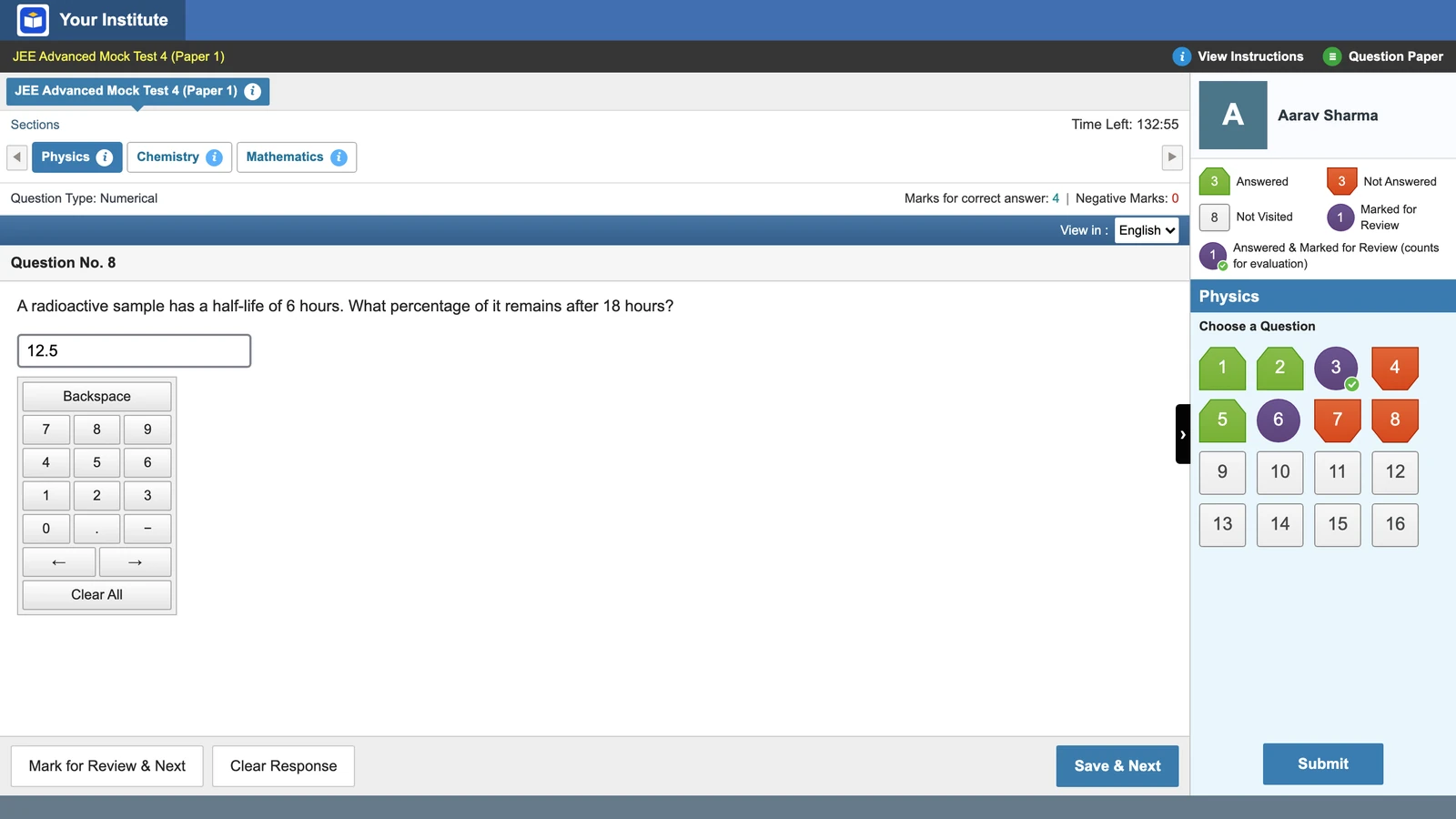
- Vacademy's GATE-style screen has a NAT keypad with a minus key, a blocked keyboard and a scientific calculator. It is not the exact TCS calculator, so students should try the official practice page too.
The habit problem
A final-year electrical student in Hyderabad takes an online GATE mock every Sunday. He types each numerical answer on his laptop keyboard. A handheld calculator sits by his notebook. He has done this for six months, and his scores are rising.
In February the keyboard will not work and the handheld calculator will not be in the room. He will click every digit of every answer, and every step of every calculation, with a mouse. Nothing in his six months of practice has prepared his hand for that.
This is a habit gap, not a knowledge gap, and it costs minutes on exam day.
NAT questions: signed decimals typed on an on-screen keypad
NAT stands for Numerical Answer Type. The GATE 2027 Information Brochure (section 7.2.1) sets four rules for it:
The range rule is on IIT Guwahati’s GATE 2026 answer key page: a NAT answer gets full marks only if it falls inside the range in the key. So rounding matters. A student who rounds halfway through a long calculation can drift out of the range and score zero with the right method.
The minus sign is the small trap. On a keyboard, a student types it without thinking. On a keypad it is one more key to find and click, and it has to come first.
The virtual calculator: no handheld calculator allowed
The brochure is direct. A virtual scientific calculator is on the computer screen, and calculators, phones, books, handbooks and printed tables are not allowed in the hall. A candidate found with one can be disqualified, whether it was used or not (section 7).
The official GATE mock links open on TCS iON’s test platform, and TCS iON’s practice calculator page is open to anyone. Its help text says it is used “with your mouse”, that “keyboard operation is disabled” and that the angle unit is Degree by default. That last point catches students who work in radians on a handheld.
The brochure also says the GATE 2027 mock links will come with the virtual calculator on the GATE 2027 website. On 13 November 2026 they were not up yet. The GATE 2026 mocks are still online, though IIT Guwahati notes that the real exam may differ from them.
Teaching GATE online? See a GATE-style mock with the calculator, the NAT keypad and the locked keyboard, on your own institute's screen.
What Vacademy’s GATE style gives you
In Vacademy, an admin picks an “Exam interface” for each test. With GATE style, students get a screen laid out like the real computer-based exam, under your institute’s logo and name.
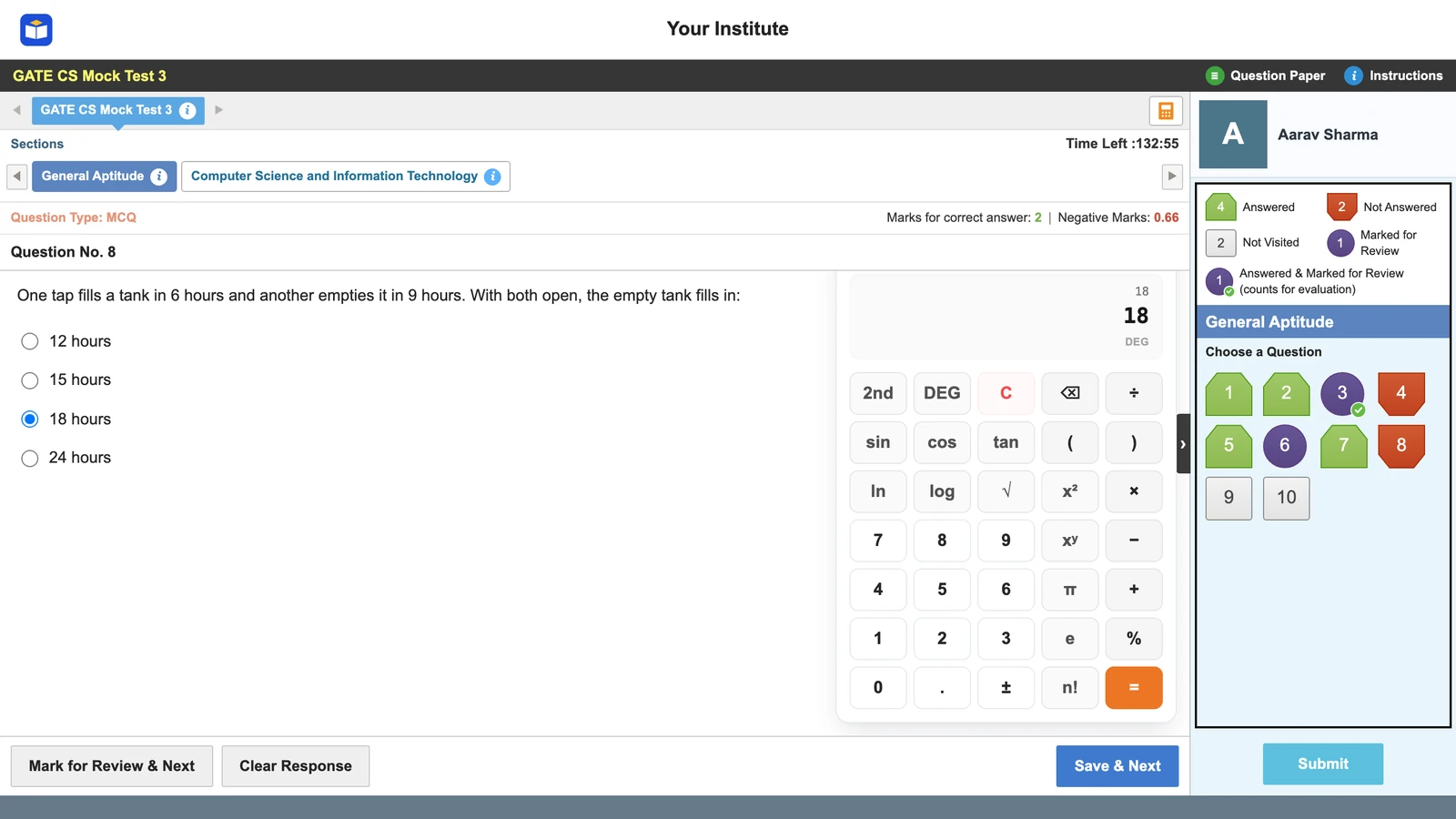
- A scientific calculator on screen, on by default. An admin can switch it off for a test, for example a General Aptitude drill.
- Numerical answers through an on-screen keypad with a minus key.
- The physical keyboard is blocked in strict mode, so the hand learns the mouse.
- Strict saving like the real exam: an answer counts only after Save & Next (or Mark for Review & Next). Jumping to another question loses an unsaved answer.
Questions come from your question bank as single-correct MCQs, multiple-correct MCQs and numerical response questions. You can type them, upload an old paper as a PDF or Word file, or generate them with AI and edit. After the mock, the report shows time spent on each question. A student who spends four minutes on an easy NAT question may be fighting the keypad, not the physics.
Where our calculator is different
Vacademy’s calculator is a scientific calculator of our own. It is not a copy of the TCS layout. The keys sit in different places, and some functions are reached in a different way. A student who practices only on ours will still meet a new key layout on exam day.
So use both. Run your mocks on the GATE-style screen for the keypad, the blocked keyboard and the full-length clock. Then ask every student to spend twenty minutes on the TCS iON practice calculator, and to take at least one official mock when the 2027 links are out. Have them try logs, powers and a trigonometric function in degrees.
One difference catches students most. On the TCS calculator you type the number first and then press the function: 30, then sin. It also has memory keys (MS, M+, MR). Practice both on the TCS page.
A weekly NAT drill plan
Short and regular beats long and rare. Every drill below runs with the keyboard blocked and the calculator on screen.
One week of NAT practice
After each Sunday mock, look at the numerical questions where time was high and the answer was wrong. Those students need keypad practice, not more theory. The learning-gaps guide explains how to read the rest of the report, and GATE time management covers pacing over the full 180 minutes. For more on AI in practice papers, see how AI can improve exam prep.
Bring one of your GATE papers to the demo. We will upload it while you watch and show it as a GATE-style mock.
Four signs your mocks build the wrong habits
- Students type NAT answers on a keyboard.
- Students use a handheld calculator in mocks.
- No one has tried the TCS practice calculator.
- Nobody checks rounding or the minus sign on NAT answers.
One tick is enough to fix before February.
Questions institutes ask
Can I use my own calculator in the GATE exam?
No. The GATE 2027 brochure allows only the virtual scientific calculator on the computer screen. Physical calculators are banned in the exam hall, and a candidate found carrying one can be disqualified.
How do you enter a NAT answer in GATE?
With the mouse, on the virtual numeric keypad shown on the screen. The brochure says the computer keyboard is disabled. The answer is a signed real number, so a negative or decimal answer is typed with the keypad's minus and decimal keys.
Is there negative marking for NAT questions in GATE?
No. NAT questions have no negative marking and no partial marks. The answer gets full marks only if it falls inside the range given in the answer key.
Where can students practice the GATE virtual calculator?
On the TCS iON practice calculator page, and on the official mock tests when IIT Madras publishes the GATE 2027 links. The brochure says the mock links and the calculator will be on the GATE 2027 website.
Does Vacademy's GATE-style test have a calculator?
Yes. GATE-style tests show an on-screen scientific calculator by default, and an admin can switch it off for a test. It is Vacademy's own calculator, not a copy of the exact TCS layout, so students should also try the official practice page.
Can students type NAT answers with the keyboard in a Vacademy GATE-style mock?
Not in strict mode. Numerical answers go through an on-screen keypad with a minus key, and the physical keyboard is blocked, as in the real exam.
Try Vacademy for your GATE batches
GATE-style mocks with the on-screen calculator, the NAT keypad and strict saving, under your institute’s name.