Key takeaways
- GATE ends on its own after 3 hours, and nobody may leave the hall early.
- Mocks that allow early Submit teach students to stop at two hours. The last hour, where marked questions get fixed, goes unpracticed.
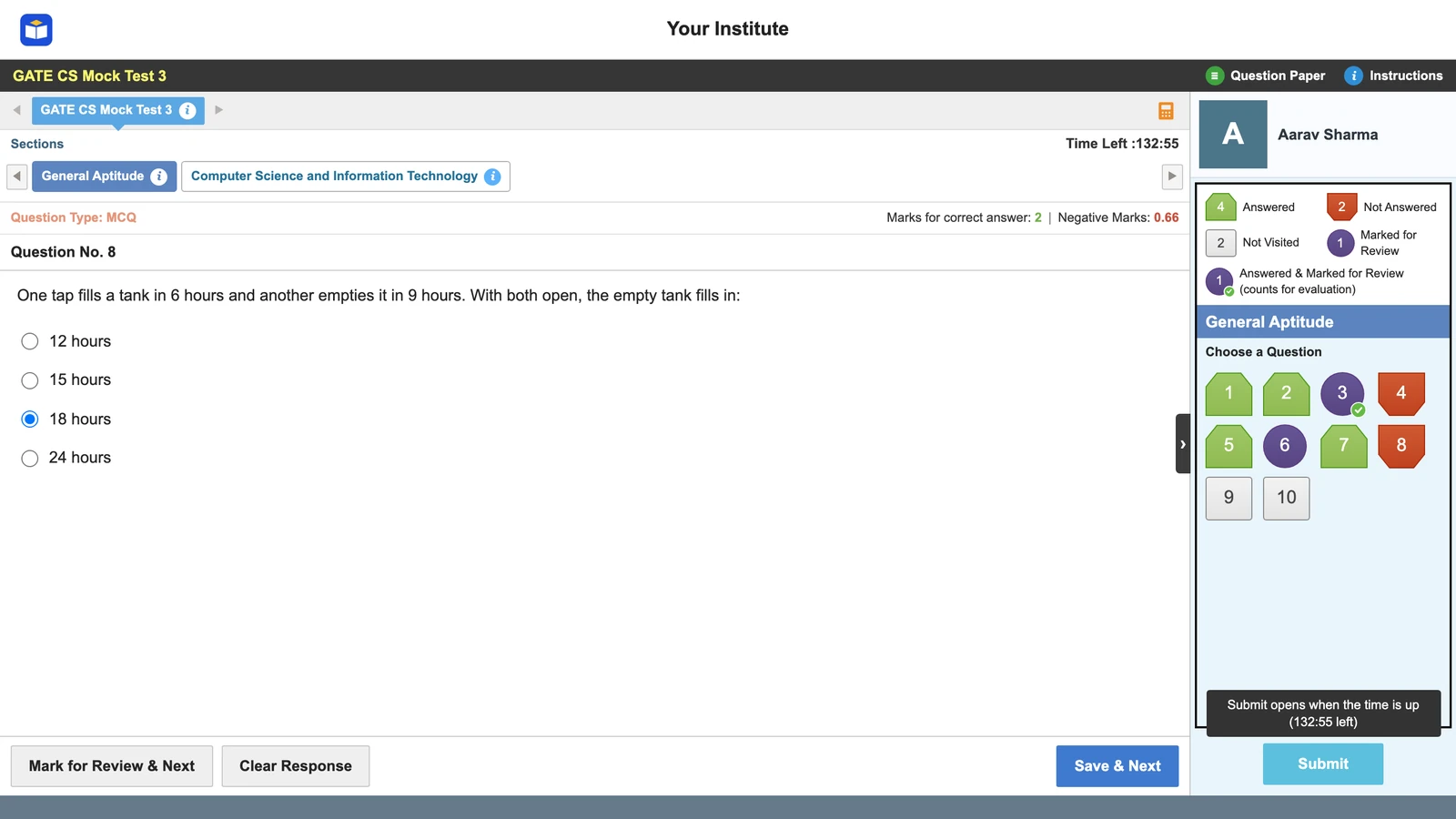
- Vacademy's GATE-style screen keeps Submit locked until time is up, in strict mode.
- Use time per question and difficulty vs performance in the report to coach pacing, student by student.
A GATE teacher in Bhopal checks Sunday’s online mock. Half the batch submitted between 2 hours and 2 hours 20 minutes. They felt done. Most had questions marked for review that they never opened again.
On exam day there is no walking out early, and the third hour has to be used. This post is about training for it.
No early exit in GATE
The GATE 2027 Information Brochure (section 7.1) sets the frame. Every paper is three hours. When the time is over, the exam ends automatically. Candidates may not leave the hall before the scheduled end.
The official mocks behave the same way. In the GATE 2026 CS mock, linked from IIT Guwahati’s mock test page, the instructions say: “When the timer reaches zero, the examination will end automatically. You will NOT be required to submit your examination.” In the 2026 mock, Submit stays switched off until the 180 minutes are over. IIT Guwahati adds that the real exam’s features may differ from the mock, so treat the mock as a guide, not a promise.
What early-Submit mocks teach without anyone noticing
Here is the arithmetic. GATE has 65 questions in 180 minutes, about 2 minutes 46 seconds each. A student who leaves at 120 minutes worked at a pace of under 1 minute 51 seconds a question. That is not a GATE pace. It is a different exam.
Locked Submit in Vacademy’s GATE style
In Vacademy, an admin picks the exam interface for each test. With GATE style and strict saving on (the default), Submit stays locked until the time is up. Hovering over it tells the student how much time is left.
- Strict saving: an answer counts only after Save & Next, or Mark for Review & Next. Jumping to another question loses an unsaved answer, as in the real exam.
- A mock test is open any time, but once a student starts, the clock is locked. Pausing for dinner is not an option.
- The palette shows Not Visited, Not Answered, Answered, Marked for Review and Answered & Marked for Review, so students learn to read their own progress at a glance.
Want your GATE mocks to run the full 180 minutes? See a GATE-style test with locked Submit on your own institute's screen.
Reading time per question and difficulty vs performance
A full-length mock is only half the work. The report is the other half. In Vacademy, every report shows time spent per question, difficulty level against performance, and how many in the batch got each question right.
Long time, wrong
The student is stuck on method. Teach the topic again.
Short time, wrong
Careless or guessing. Slow down on this type.
Long time, right
Knows it, but slowly. Timed drills on this topic.
Short time, right
Strong. Use the saved minutes for the second pass.
Watch the easy questions most. A student who spends five minutes on a question most of the batch got right is losing time that a harder question needed. The learning-gaps guide and From Marks to Meaning go deeper into reading reports. For students who drift away between mocks, see activity tracking in test prep.
See the time-per-question report from a full GATE-style mock, and how a teacher reads it for one student.
A pacing plan: General Aptitude, then core
General Aptitude is 15 of the 100 marks, so 15% of the time is about 27 minutes. The plan below is a starting point. Adjust it per student once you have three or four reports.
180 minutes, four blocks
Our suggested plan, not a GATE rule.
Three marking facts from the brochure shape the last two blocks:
- MSQ and NAT questions have no negative marking. A blank one scores zero, so never leave one blank in the last check.
- A wrong 1-mark MCQ loses 1/3. A pure guess among four options averages out to zero. Cut one option and the guess is worth about +1/9 of a mark on average.
- In the official mock, an answered question marked for review is still evaluated. So mark it with your best answer saved. For an MCQ, save one only if you can rule out at least one option.
Five signs your GATE mocks teach the wrong pace
- Students can submit a full mock before 180 minutes.
- Many submit with questions still marked for review.
- Nobody looks at time per question after a mock.
- Each student picks the section order on the day.
- Students guess blind on MCQs and leave MSQs and NATs blank.
Two or more ticks? Your full mocks are shorter than the real paper.
When early Submit is fine
Locked Submit is not right for every test. In the first weeks, and for topic tests, Vacademy’s practice-friendly mode saves every click and always allows Submit. A student learning a new chapter should not sit for an hour after finishing. Switch full GATE mocks to strict mode once the syllabus is covered, and keep them there until exam day.
Two more posts in this series cover the NAT keypad and virtual calculator and a GATE 2027 test series plan.
Questions institutes ask
Can you submit the GATE exam early?
No. The paper ends on its own when the 3 hours are over, and candidates may not leave the hall before the scheduled end. The official GATE 2026 mock told candidates they would not be required to submit.
How much time should I spend on each GATE question?
On average, 180 minutes for 65 questions is about 2 minutes 46 seconds a question. General Aptitude is 15 of the 100 marks, so about 27 minutes is a fair share for it.
Should students attempt General Aptitude first in GATE?
It is a sensible default, because GA has only 10 questions and 15 marks, and finishing it settles the nerves. Some teachers prefer core first. Either works if the student fixes the order in mocks and keeps it on exam day.
Is there negative marking for unattempted or MSQ questions in GATE?
No. Unattempted questions score zero. MSQ and NAT questions have no negative marking, so they should not be left blank at the end. Only wrong MCQ answers lose marks (1/3 or 2/3).
Does an answered question marked for review count in GATE?
In the official GATE 2026 mock, yes. Its instructions say Mark for Review & Next saves your answer, and the console counts answered-and-marked questions. A question marked without an answer scores nothing.
Can Vacademy lock the Submit button in a mock test?
Yes. In GATE style with strict saving on, Submit stays locked until the time is up. Practice-friendly mode always allows Submit, which suits the first weeks.
Try Vacademy for your GATE mocks
Full-length GATE-style mocks with locked Submit, and reports that show where each student’s minutes went.