Key takeaways
- A new question type, Spreadsheet & Written Response, in the question bank, in tests and in lesson question slides.
- One question can have several parts. Each part is a spreadsheet with formulas or a writing area.
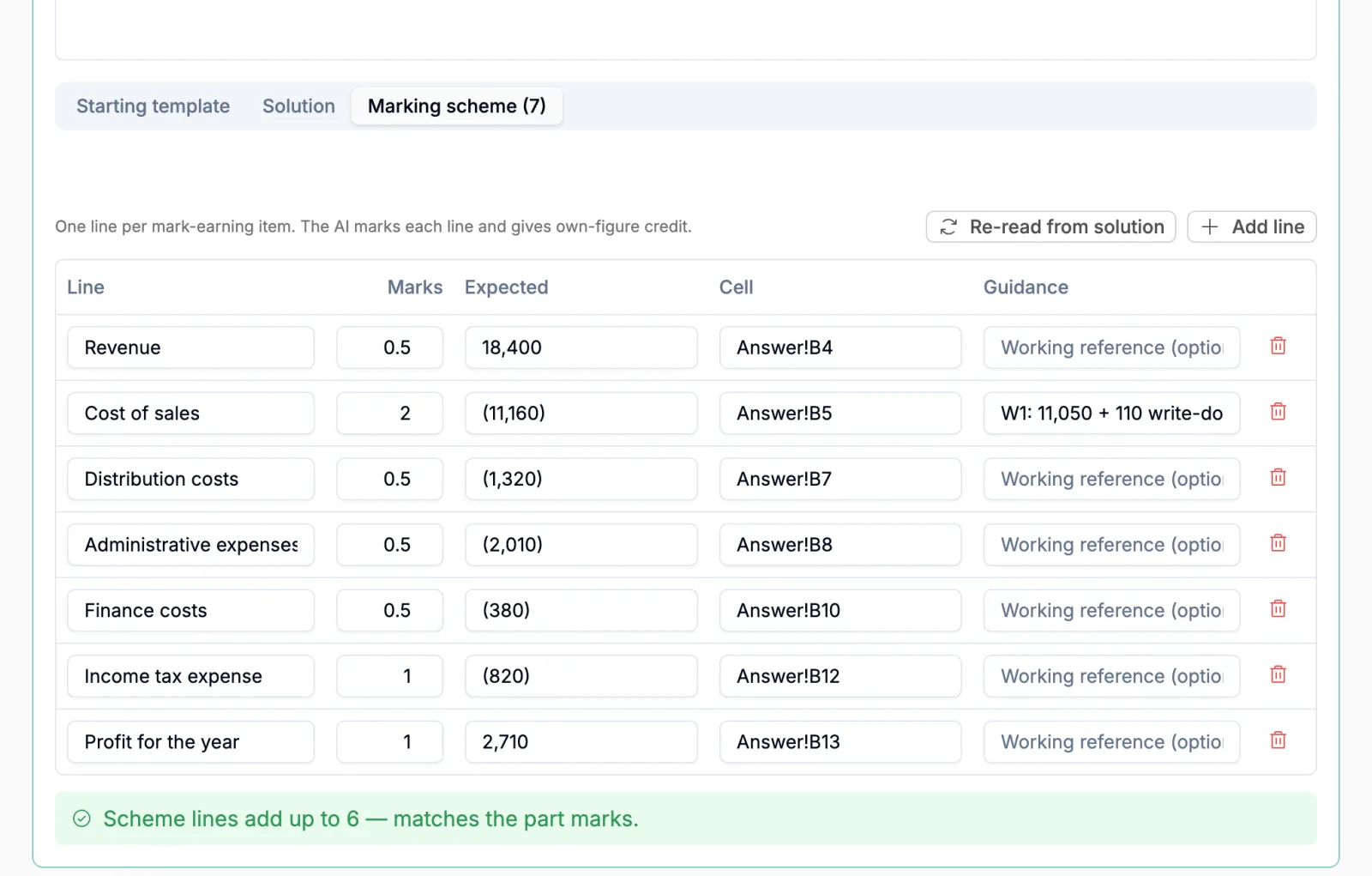
- Upload your solution as an Excel file. If it has a Marks column, the marking scheme fills itself.
- AI marks line by line, reads the formulas, and gives credit when a student carries their own earlier figure forward.
- In tests, a teacher checks the AI's marks before results go out. In lessons, students get marks, feedback and the model solution in seconds.
Sunday morning in Kochi. A student preparing for ACCA Financial Reporting finishes a past question on paper, adds it up on a calculator and checks the answer at the back of the book. On exam day there will be no paper. ACCA says all its exams are taken using a computer. Its guide to Applied Skills exams adds that when students use formulas, markers see the formulas, not just the final answer.
Practicing on paper is practicing for a different exam. The student never learns to lay out workings in cells, to let a formula carry a total, or to move between the case and the answer on one screen. And the teacher has no quick way to mark a spreadsheet answer. Emailed Excel files pile up and get opened one by one.
In November an institute that teaches ACCA asked us for exactly this: their own practice questions on a screen like the real one, and the answers checked by AI against the solution they already have. It is now part of Vacademy for every institute.
At a glance
What is new
What the student sees
The question opens as a split screen. The case sits on the left, with its tables and notes. The requirement and the answer sit on the right. A student who needs more room for the sheet drags the divider.
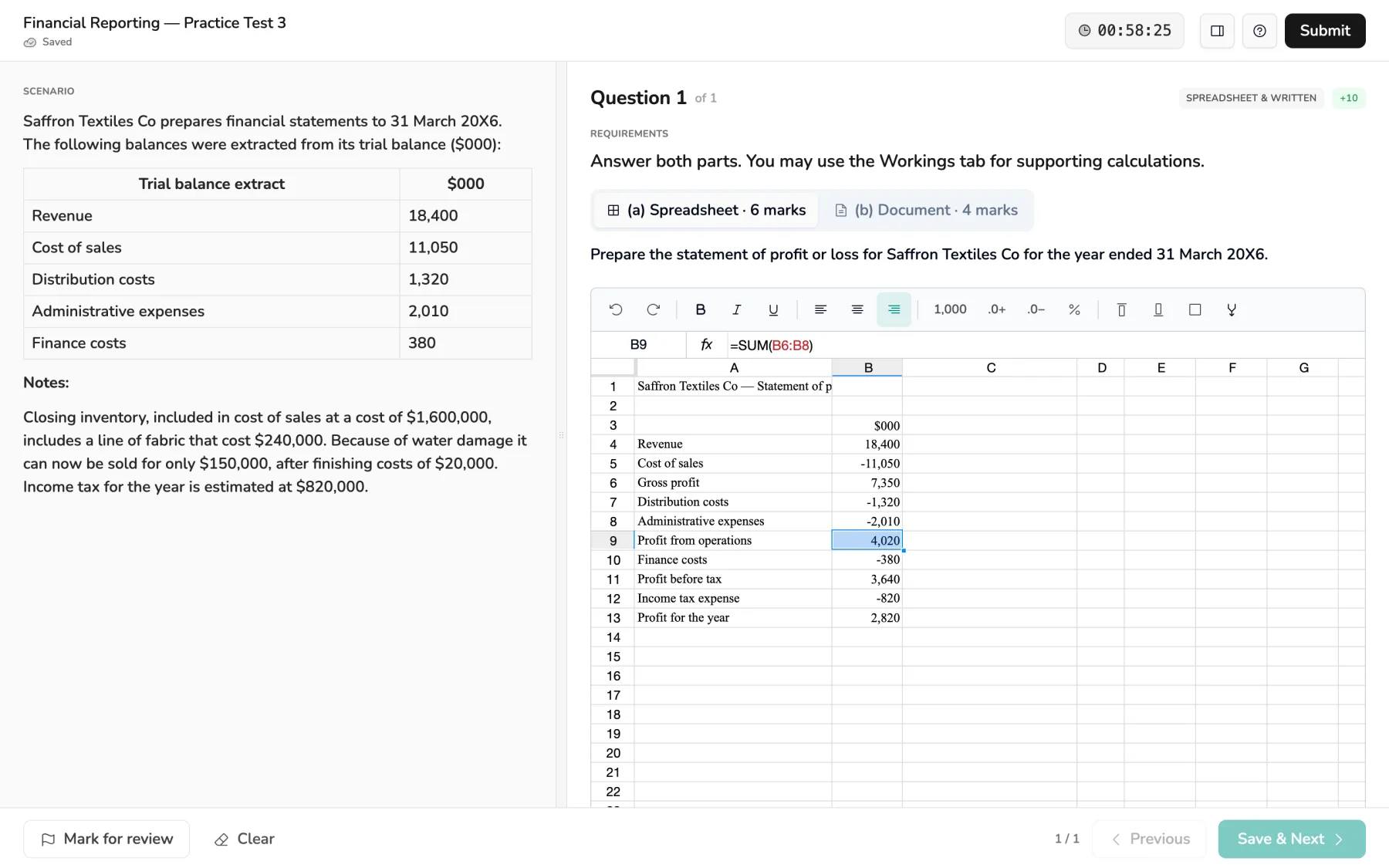
The spreadsheet works the way students expect. Click a cell, type a figure or a formula, press Enter. Totals update by themselves. The toolbar keeps to what an exam answer needs: undo, bold, italic, underline, alignment, commas, decimal places, percentages and borders. Rows and columns can be added or removed. A teacher can give the sheet more than one tab, say one for the answer and one for workings.
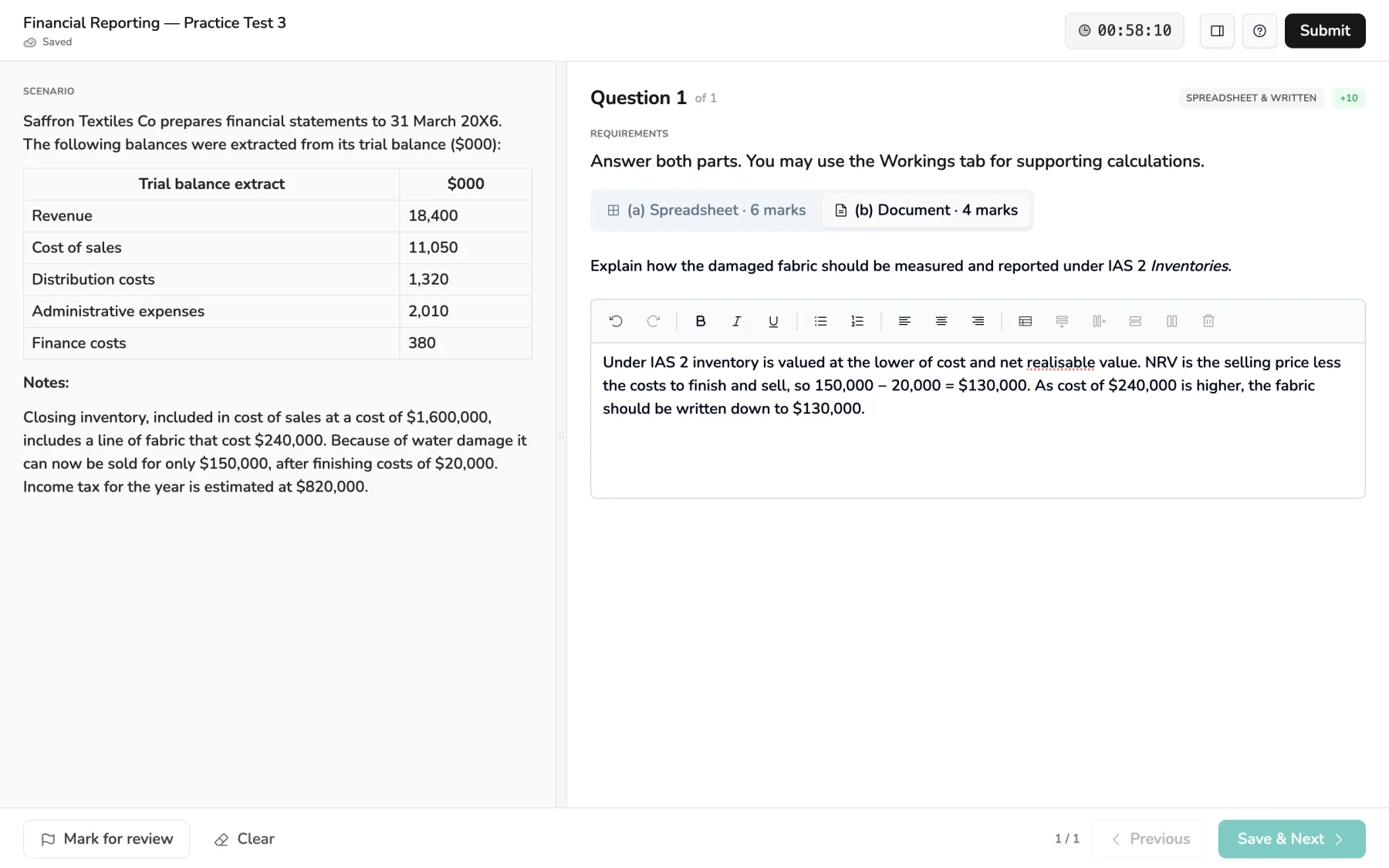
A written part opens a clean writing area instead, with bold, lists and tables. That is where the student explains a treatment, drafts a memo or lists the points a question asks for. Parts sit in tabs above the answer, each with its marks, so the student always knows what is left.
How a teacher sets one up
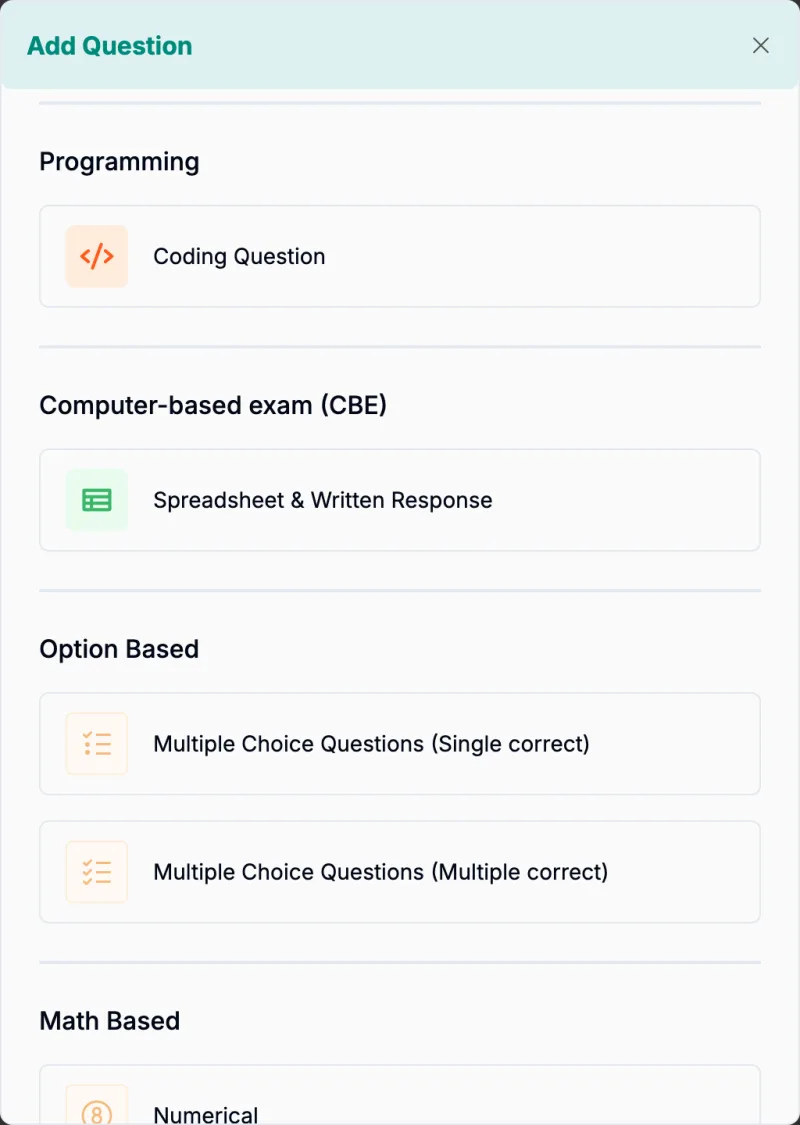
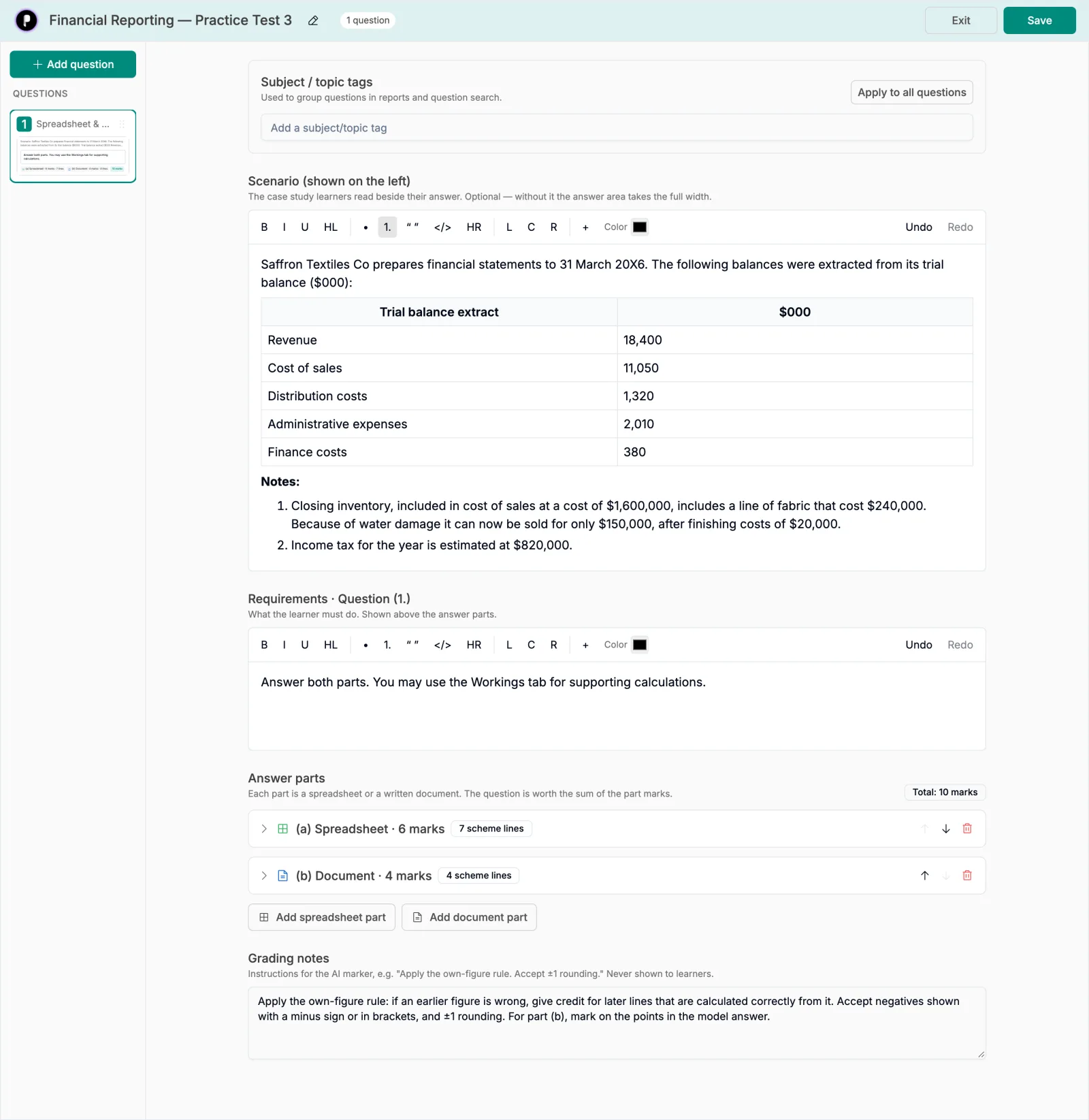
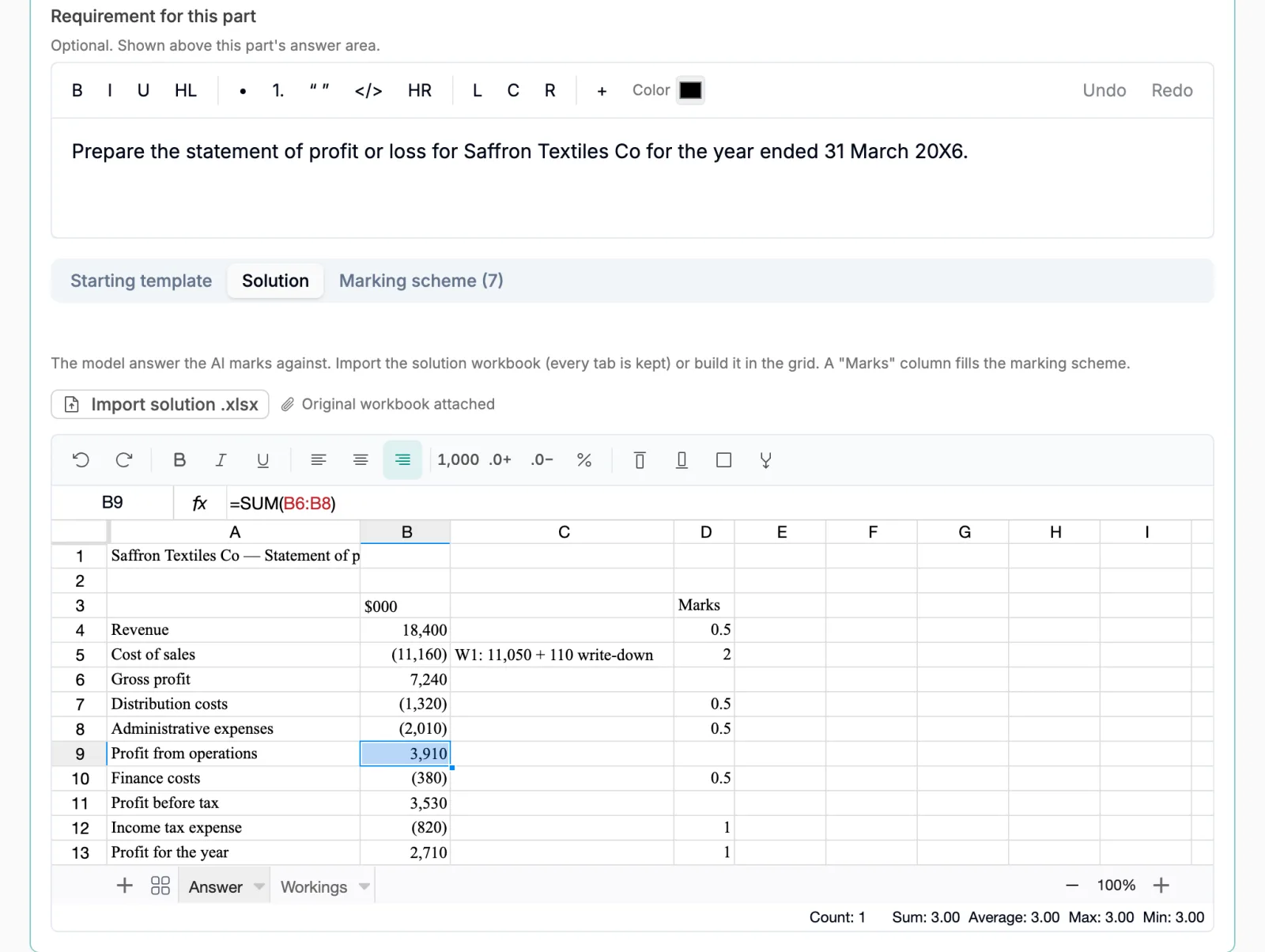
Most accounting teachers already keep their solutions in Excel. The set-up is built around that file, so a question takes minutes, not an afternoon.
Real screens
From an Excel solution to a marked question
The one tip that saves the most time
Before you import, add a column headed Marks next to your solution and put the marks against each line. Vacademy turns every line with a mark into a line of the marking scheme. Nothing to retype.
How the AI marks it
The AI does not look at a picture of the sheet. It reads every filled cell, row by row, with the value and the formula behind it. Then it marks each line of your scheme against your solution.
What the AI is given
The student's sheet, as the marker reads it
[Part (a) · Spreadsheet · 6 marks]
Row 4: A4 "Revenue" | B4 = 18,400
Row 5: A5 "Cost of sales" | B5 = -11,050
Row 6: A6 "Gross profit" | B6 = 7,350 [=B4+B5]
Row 9: A9 "Profit from operations" | B9 = 4,020 [=SUM(B6:B8)]
Row 13: A13 "Profit for the year" | B13 = 2,820 [=B11+B12]
…every filled cell, row by row
Why the formula matters
This student forgot to write down the damaged fabric, so cost of sales is short by 110 and every total below it is 110 too high.
A checker that compares numbers only would cut marks on every total. Because the AI sees =SUM(B6:B8), it can tell the method is right and the error came from one line above. The student loses marks on cost of sales and keeps the own-figure credit on profit for the year. You can see exactly that in the result below.
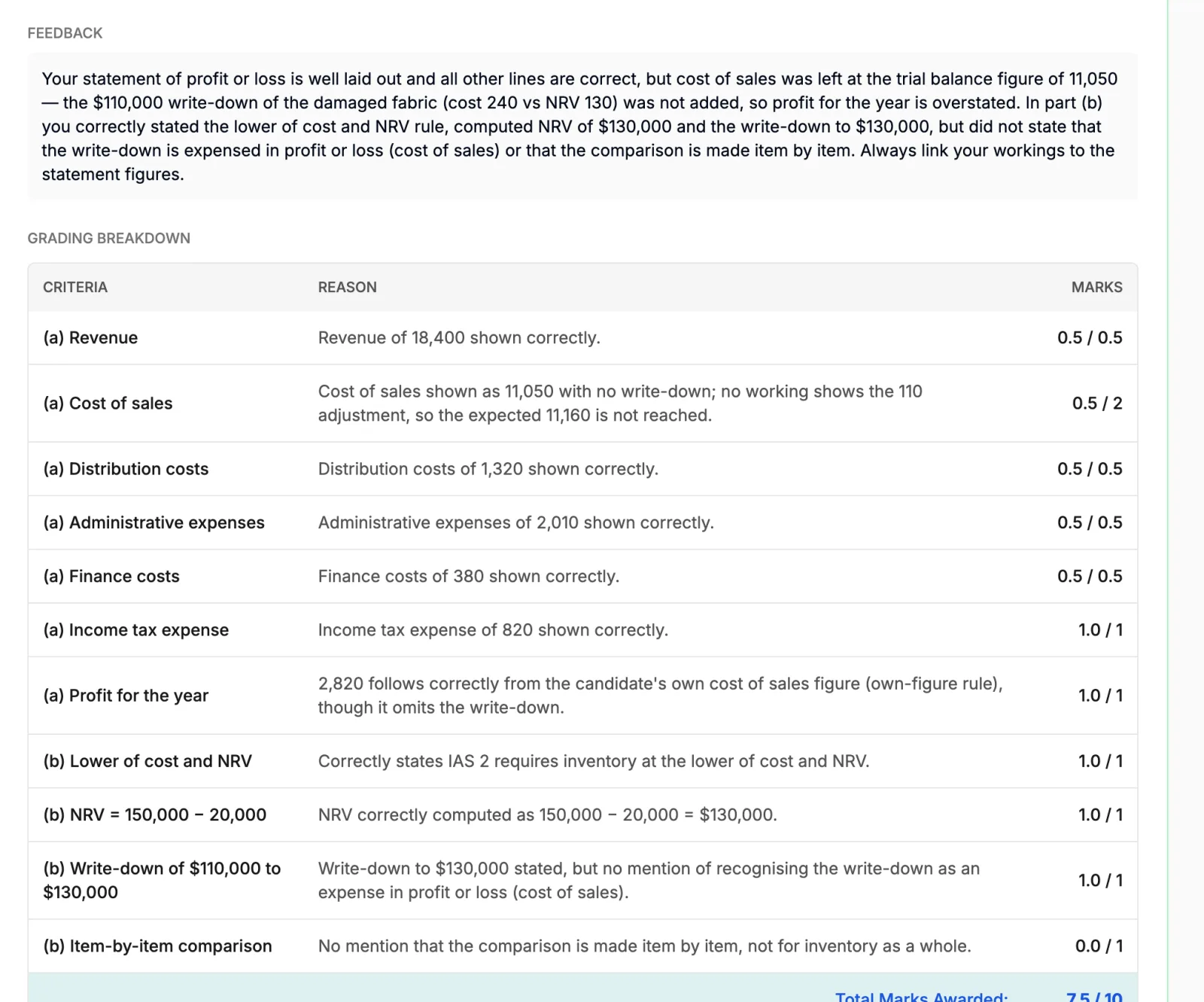
Here is what it gave our sample answer, the one that forgot the write-down. For part (b) the teacher had added four lines to the scheme, one per key point. These are the marks and reasons exactly as the product showed them, in a test, before release.
| Line | Marks | Why |
|---|---|---|
| (a) Revenue | 0.5 / 0.5 | Revenue of 18,400 shown correctly. |
| (a) Cost of sales | 0.5 / 2 | Cost of sales shown as 11,050 with no write-down; no working shows the 110 adjustment, so the expected 11,160 is not reached. |
| (a) Distribution costs | 0.5 / 0.5 | Distribution costs of 1,320 shown correctly. |
| (a) Administrative expenses | 0.5 / 0.5 | Administrative expenses of 2,010 shown correctly. |
| (a) Finance costs | 0.5 / 0.5 | Finance costs of 380 shown correctly. |
| (a) Income tax expense | 1.0 / 1 | Income tax expense of 820 shown correctly. |
| (a) Profit for the year | 1.0 / 1 | 2,820 follows correctly from the candidate's own cost of sales figure (own-figure rule), though it omits the write-down. |
| (b) Lower of cost and NRV | 1.0 / 1 | Correctly states IAS 2 requires inventory at the lower of cost and NRV. |
| (b) NRV = 150,000 − 20,000 | 1.0 / 1 | NRV correctly computed as 150,000 − 20,000 = $130,000. |
| (b) Write-down of $110,000 to $130,000 | 1.0 / 1 | Write-down to $130,000 stated, but no mention of recognising the write-down as an expense in profit or loss (cost of sales). |
| (b) Item-by-item comparison | 0.0 / 1 | No mention that the comparison is made item by item, not for inventory as a whole. |
| Total | 7.5 / 10 |
Practice in lessons, real marks in tests
The same question works in two places, and they behave differently on purpose. Practice should be fast. A test result should be checked by a person.
| In a lesson | In a test | |
|---|---|---|
| Where students meet it | A question slide inside a course chapter | An assessment or mock test |
| Who marks it | AI, straight away | AI drafts the marks, a teacher checks them |
| When the student sees marks | In seconds, with feedback on every line | Only after the teacher releases the result |
| Model solution | Shown after the first checked attempt | Shown with the released result |
| Attempts | Three AI checks per student, by default | As set for the test |
In a lesson, the student presses the check button and waits a few seconds. Back come the marks, a short note on what went wrong, a line-by-line table and the model solution. If they have checks left, they can fix the sheet and try again.
In a test, nothing reaches the student when they submit. If AI evaluation is turned on for the test, the AI drafts the marks within moments. The teacher opens the review screen, reads the student’s sheet next to the marks, adjusts anything they disagree with, and releases. Students then see their marks, the feedback and the model solution together.
Fair and safe by design
For institute owners: what this means
For an ACCA or accounting institute, this is not a nice extra. Exam technique on screen is part of what students pay you for. And the marking load is simple arithmetic: sixty students and a ten-line scheme is six hundred figures to check for one question. With the AI drafting the marks, the teacher checks the lines that look wrong instead.
The fear is worth naming: can an AI be trusted with marks? In tests, it never has the last word. Your teacher sees every line and every reason before a student does. In lessons, where speed matters more than a final grade, students get the feedback straight away.
The same question type suits any paper where the answer is a calculation with workings or a short explanation: audit, taxation, management accounting, financial management, and commerce or MBA finance courses. See how it sits with the rest of the assessment engine and with AI evaluation of written answer sheets.
Honest limits
- It is a spreadsheet in the browser, not Microsoft Excel. Common formulas work. Charts, macros and pivot tables are not part of it.
- It is not ACCA’s exam software, and it is not a copy of its screen. It is inspired by the way those exams work. Students should still try ACCA’s free CBE Practice Platform before the real exam.
- A spreadsheet needs room. It works on a phone, but students will practice best on a laptop.
- AI marking uses your institute’s AI credits, and in tests it needs AI evaluation turned on.
Questions institutes ask
Is this the official ACCA exam software?
No. Vacademy is not connected to ACCA. The question type is inspired by the way computer-based exams work: a case to read, a spreadsheet and a writing area to answer in. Students practice that inside your own course. They should still try ACCA's free CBE Practice Platform before the real exam.
Can we use the Excel solutions we already have?
Yes. Import the .xlsx file into the question and every tab comes with it. If the file has a column headed Marks, each line with a mark becomes a line of the marking scheme. You can edit the lines after the import.
Does the AI give marks when a student carries a wrong figure forward?
Yes. This is the own-figure rule. If the method is right but one input came from the student's own earlier mistake, the line still earns its marks. The AI reads the student's formulas to check this, so the same mistake is not punished twice.
Can a teacher change the AI's marks before results go out?
Yes, in tests. The AI's marks are a draft. A teacher opens the review screen, sees the student's sheet and every line with its reason, changes any mark, and then releases the result. Students see nothing before that.
How many times can a student check an answer in a lesson?
Three AI checks per student on each question slide, by default. A blank answer is not sent for checking and does not use one. After the first checked attempt the student also sees the model solution.
Do students need Microsoft Excel installed?
No. The spreadsheet and the writing area run in the browser, inside your Vacademy app. Common formulas like SUM work, and numbers can be shown with commas, decimals or as percentages. Charts, macros and pivot tables are not part of it.
Which courses is it useful for?
Any course where the answer is a calculation with workings, or a short written explanation: financial reporting, audit, taxation, management accounting, financial management, and commerce or MBA finance papers. It works for one-part and multi-part questions.
Does AI marking cost extra?
AI marking uses your institute's AI credits, like other AI features in Vacademy. A blank answer costs nothing. If the credits run out, the student's answer is still saved, so nothing is lost.
See it with one of your own questions
Send us a past question and its Excel solution. We will set it up and show your team how students answer it.