On a Saturday in a coaching center in Bhopal, a Class 10 science part test ends at 4 pm. One hundred and twenty copies, five pages each. Six hundred pages. At twelve to fifteen minutes a copy, that is twenty-five to thirty hours of a teacher's time before the first result goes out. That is where the weekend goes — and the results still reach students on Wednesday, when the mistake has already been forgotten.
Most "auto-evaluation" does not touch this problem. It works when students type their answers online. Board-pattern papers, subjective questions and numericals with working are written by hand, on paper. That is exactly the checking that stays manual.
AI evaluation is built for that paper. Teachers call it copy checking; on Vacademy the button says Evaluate with AI — same thing: the AI evaluates the copy, and the teacher gets it back checked. This post explains, step by step, what happens to a scanned copy on Vacademy's AI evaluation, how it is priced, where it can go wrong, and what stays with the teacher. The whole checked copy from the pilot is here as a PDF — all five pages, exactly as they came back.
The arithmetic of one periodic test
12–15 min
A teacher's time per 5-page copy
Typical periodic test
3–5 min
AI time per 5-page copy, in the background
Vacademy pilot, Sept 2026
200
Copies in one bulk upload, names read off the sheet
Vacademy, Sept 2026
What a checked copy looks like
Not a score in a table. The student's own pages, with the marking on them — the thing a parent holds up and reads. Ticks and crosses beside the answers, marks per question in the margin, a short note where marks were lost, and the total on the first page.
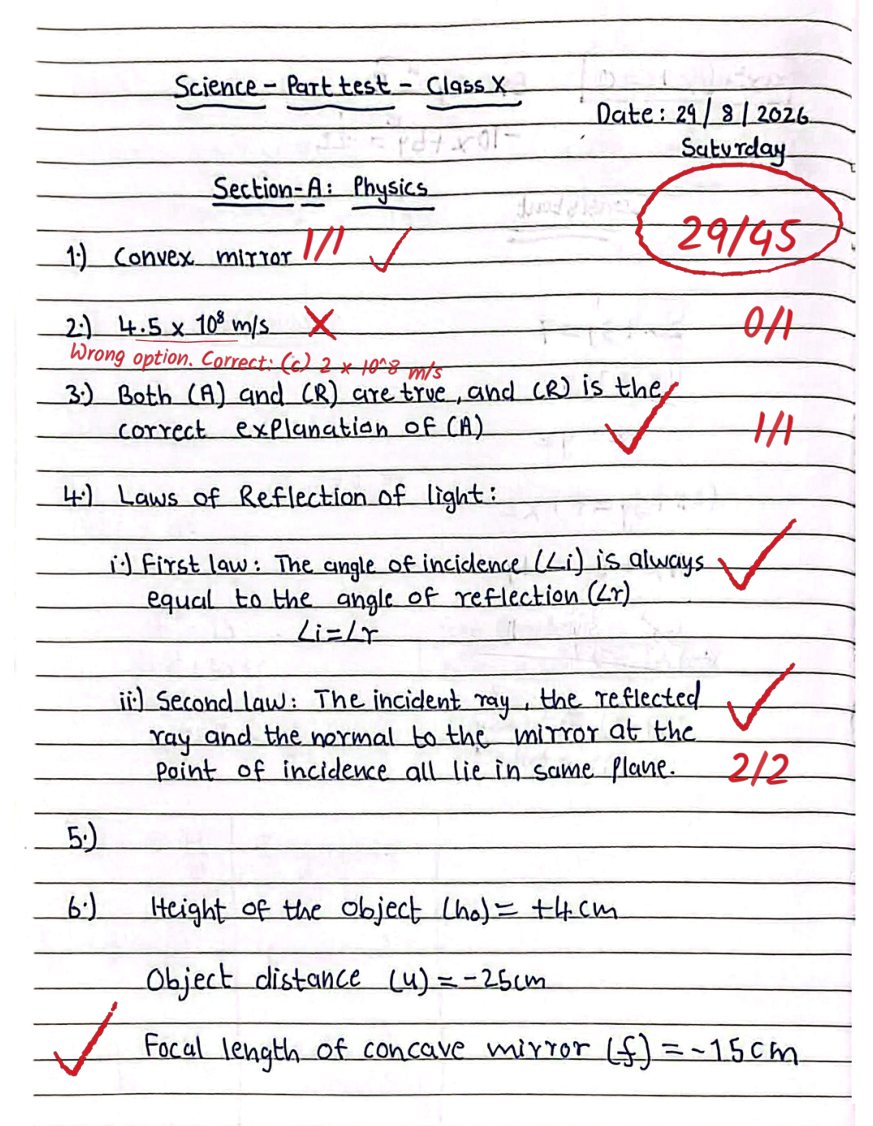
All five pages exactly as they came back from AI evaluation — Class 10 science part test, 21 questions, 29/45. Use the arrows to turn the pages. Scanner badges cropped; no student name on any page. Download the PDF.
How AI evaluation of an answer sheet works, step by step
Five steps. The first and the last belong to the teacher.
1. Upload the scanned copies
One copy from a student's row, or the whole batch — up to 200 PDFs — with Bulk AI check.
The page count of every file, and what the check will cost from your credit balance, is shown before you press Start. Nothing is spent yet.
2. The handwriting is read
Each page is scanned for its layout, then read by a vision model — cursive, corrections, margin working and all.
In a bulk upload the name and roll number at the top of the sheet are read too, and matched to your batch list.
3. Every question is graded against your scheme
Marks come from the paper's marking scheme and model answers. Step marks and partial credit follow the scheme.
The criteria are generated once for the paper and reused for every copy, so copy 90 is judged exactly like copy 9.
4. The checked copy comes back
A tick or cross beside each answer, marks like 2/3 in the margin, a one-line note where marks were lost, the total on page one.
It is the student's own PDF with the marking drawn on it — what a parent expects to see, not a score in a table.
5. The teacher reviews and releases
Per-question marks and notes sit on a review page. Change anything. Open the copy in the marking tool and move a mark on the page.
Results reach students only when the assessment's release rule says so. The AI never overwrites a teacher's edit.
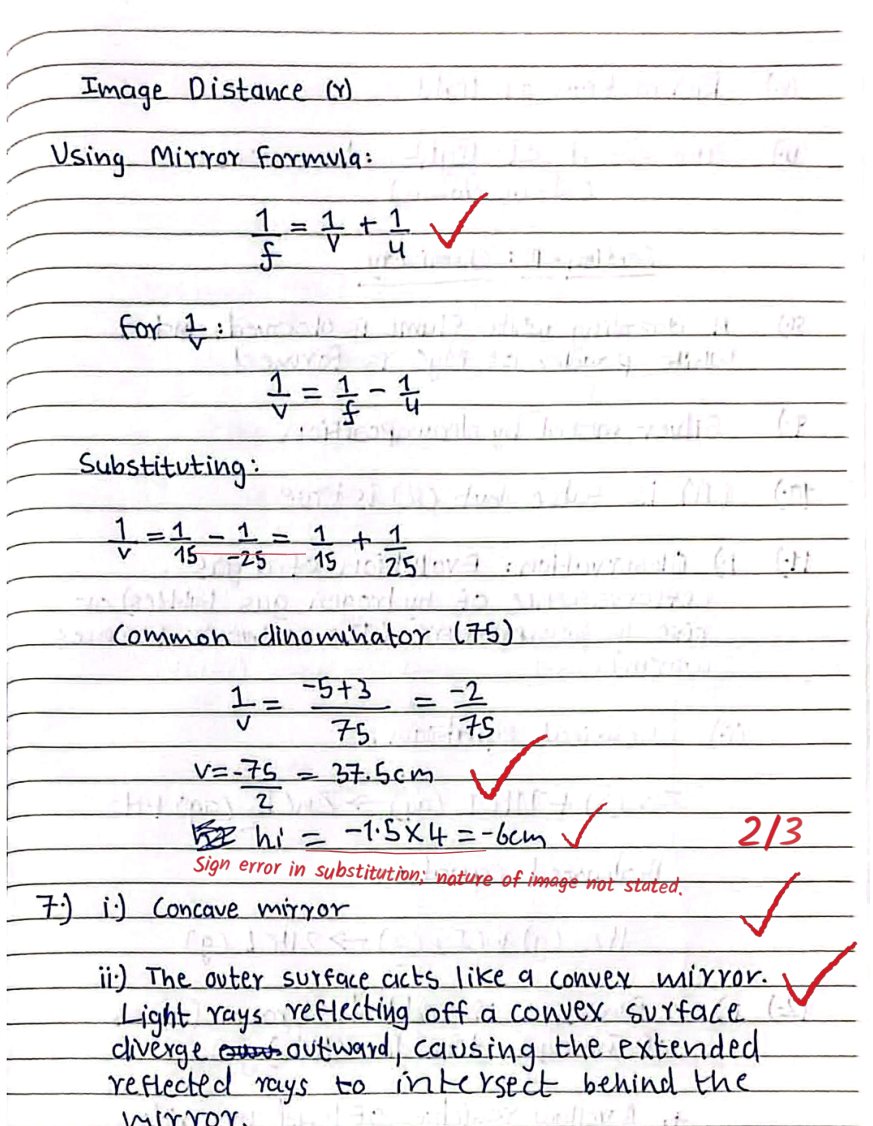
Page 2 of the same copy: the mirror-formula working is ticked step by step and the numerical gets 2/3 with the note “Sign error in substitution; nature of image not stated” — the kind of note a student can actually act on.
The bulk problem nobody talks about: whose copy is this?
Checking a copy is one job. Knowing which student it belongs to is another. When you drop 120 scanned PDFs into a folder, nothing in the file name says “Anushka, roll 12”. So Vacademy reads the name and roll number the student wrote at the top of page one and matches it to the batch.
A roll number settles it outright. A name is matched even when it is misspelt, abbreviated or written surname-first. And when it cannot be settled — two students called Aman Sharma in the same batch, or no name on the sheet at all — the copy is not assigned. It waits, with the two or three likely students suggested, until a person picks one. The fear is worth naming: a copy on the wrong student's record is the one mistake the system is built never to make.
When the batch is done you get an email, an alert in the dashboard and a notice on screen, with a count of how many copies need a decision. You do not sit and watch it.
How AI evaluation is priced
Per page of the copy, from your institute's Vacademy credit balance. A two-page weekly quiz costs a fraction of a twelve-page pre-board, there is no per-teacher seat, and the exact credit cost is shown before you press Start — so nobody is surprised. A copy that fails, or that you stop, is not charged.
What that comes to for your institute depends on two numbers: how many copies you check in a batch, and how many tests you run in a term. Those are the two numbers we ask for on a demo call, and we quote from them — for a 120-student batch running weekly tests it is a different conversation from a school checking pre-boards twice a year.
Tell us your batch size and tests per term — we will send the per-page rate and what a year of checking would come to.
What it does — and what it is built not to do
An honest list matters more than a long one. Every line on the right is a deliberate refusal, not a missing feature.
| It does | It does not |
|---|---|
| Reads ordinary student handwriting on a clear scan | Rescue a copy scanned at an angle in bad light — it flags it instead |
| Grades against the marking scheme you set | Invent a scheme when the paper has none — criteria are generated once and shown to you |
| Matches a bulk copy to a student by name and roll number | Guess between two students with the same name — that copy waits for you |
| Charges once, when a copy is fully checked | Charge for a copy that failed or that you stopped |
| Puts marks on the review page for you to change | Publish anything to a student on its own |
What this means for an institute
For an institute, this is not a feel-good feature. A weekly test whose checked copies reach students the same evening changes what the next class is about: the teacher walks in knowing which question the batch lost marks on, and spends the hour there. Parents get a checked copy in the app, not a number on WhatsApp. And the teacher-hours saved on the red pen become doubt sessions — the thing students actually leave an institute for the lack of.
The marks also land where every other evaluation lands on the platform, so reports, release rules, parent communication and automations pick them up without a spreadsheet in between.
Send us ten scanned copies and your marking scheme
In a 30-minute session we upload them, you watch the checked PDFs come back, and we walk through the review page and the release rule. No setup on your side.
Frequently Asked Questions
What is AI evaluation of answer sheets?
AI evaluation grades a scanned, handwritten answer sheet the way a teacher does: it reads the handwriting, marks each question against the marking scheme, and writes ticks, marks and short notes on the copy itself. Teachers call it AI copy checking, AI answer sheet checking, AI grading or AI assessment — on Vacademy these are one feature, AI evaluation. The teacher reviews the marks and decides when students see them.
Can AI check handwritten answer sheets?
Yes. A vision model reads the scanned PDF page by page, including cursive, crossed-out working and margin notes. If a copy is too faint or badly scanned to read properly, the system says so and flags the copy for a teacher rather than guessing.
How much does AI answer sheet evaluation cost?
On Vacademy it is priced per page of the copy, from the institute's credit balance, with no per-teacher seat. The exact credit cost is shown before a check starts, and a check that fails or is stopped is not charged. The rate for your institute depends on batch size and tests per term — ask for a quote on the demo form.
How accurate is AI answer sheet evaluation?
Every copy is graded against the same marking scheme and model answers, so it is at least as consistent as human checking across a batch. Doubtful marks are shown to the teacher with the AI's note, and the teacher can change any mark before results are released. In a Class 10 science pilot, a 21-question copy needed one correction.
How long does AI take to check answer sheets?
About 3 to 5 minutes for a 5-page copy. Bulk uploads run three copies at a time in the background, so 100 copies finish in roughly 2 to 3 hours, and the admin gets an email and an in-app alert when the batch is done.
Can I upload a whole batch of answer sheets at once?
Yes, up to 200 PDF copies per upload. The AI reads the student's name and roll number from the top of each sheet and matches it to the batch. A copy with two possible students, or no readable name, is held for the teacher to assign — it is never placed on the wrong student by a guess.