Key takeaways
- In rural India, 94.2% of households have a phone but only 4.2% have a computer (MoSPI, 2022-23). The RRB JE exam is taken on a computer.
- Use the phone for short daily tests and the laptop, or your center's computers, for full-length mocks.
- Keep the same screen rules on both: Railway JE (RRB) style, strict saving, Submit locked until time is up.
- On a laptop or desktop, your institute's logo and name sit in the test header. Branded Android and iOS apps take 20 to 25 working days.
The device gap
A diploma student in a village outside Gorakhpur. He watches your Electrical lectures on a phone, does the daily quiz on the same phone, and has never used a mouse for more than ten minutes. If he clears CBT 1, he will sit CBT 2 at a test center, on a computer, for two hours.
He is not unusual. The government’s Comprehensive Annual Modular Survey 2022-23 found that 94.2% of rural households have a phone. Only 4.2% have a computer of any kind, desktop or laptop. For urban households the figures are 97.1% and 21.6%.
MoSPI, NSS Report No. 590 (2022-23)
Households with a phone vs a computer
For an institute, this is not a side issue. If every mock is a tap on a phone, the first time a student uses a mouse under time pressure will be the real exam.
What the exam screen is like
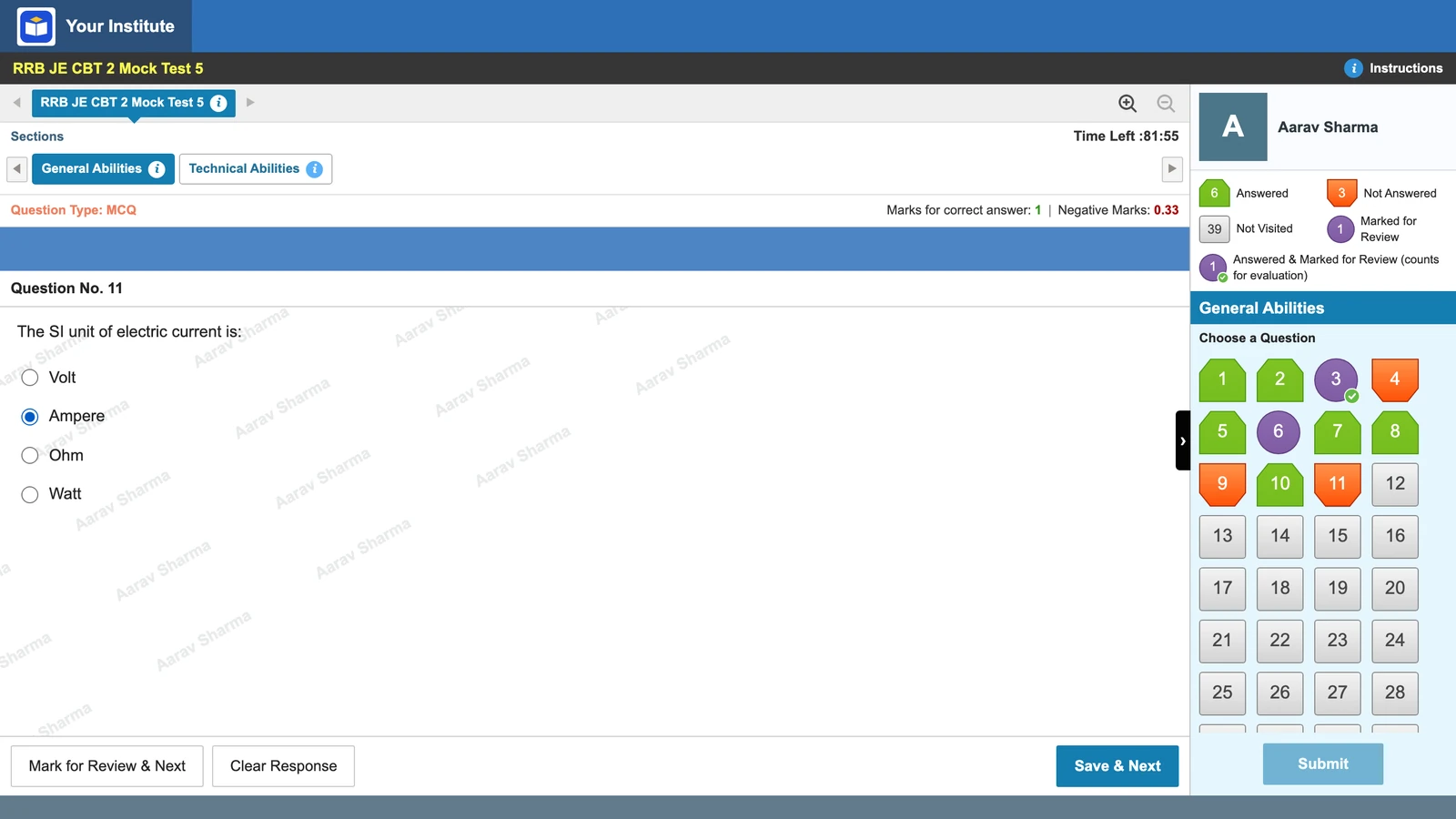
The notice says RRB puts mock tests on its websites so candidates can learn the online exam, and for CEN 04/2026 the CBT 1 mock was linked on 17 October 2026. Phones, calculators, pens and paper are banned inside the center. Candidates carry the e-call letter and an original photo ID (CEN 04/2026, Important Instructions xix and para 19.0; or via the RRB website). A pen is given out at the center, and the mock’s instructions say rough sheets are provided. From the official mocks:
CBT 2 adds a virtual calculator on the screen. In the official mocks, Submit never opens before time is up: the paper submits itself at zero.
Daily practice on the phone
The phone still has a job: short, daily tests that keep a topic fresh. On Vacademy, a test set to the Railway JE (RRB) style exam interface opens in a phone layout. The question, marks row and three buttons fit the screen. The question palette, with its legend and Submit, opens as a bottom sheet.
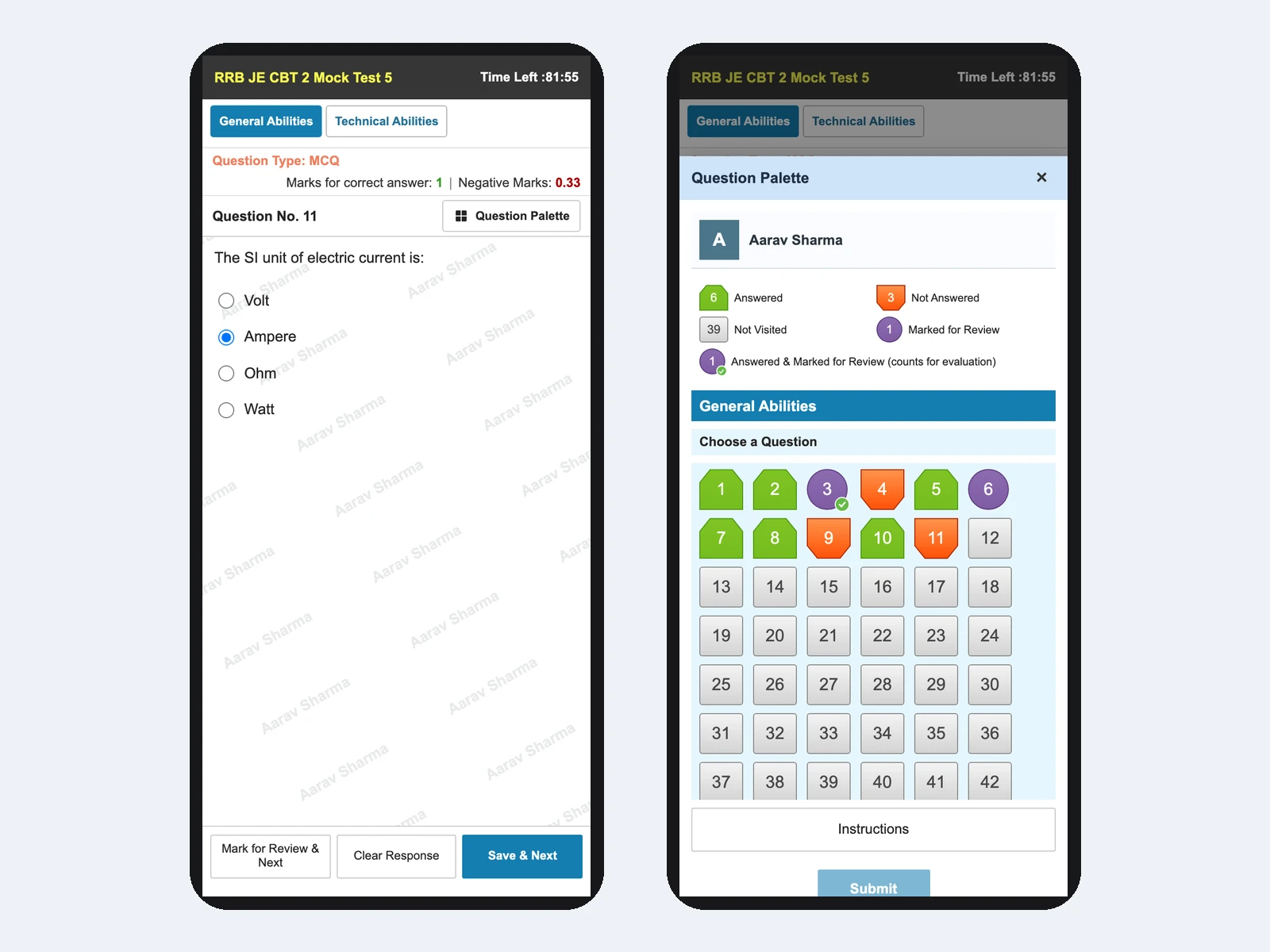
The rules travel with it. With strict saving on, an answer counts only after Save & Next, and a pick left unsaved is lost, as in the real exam. Submit stays locked until time is up. So the habits grow daily, even on a small screen: save before you move, read the palette colors.
- Set daily tests as mock tests: students start when they like, and the clock locks once they begin.
- For a brand-new batch, use practice-friendly mode for a week. It saves every tap and always allows Submit. Then switch to strict.
Full mocks on a laptop or at your center
The full-length mock is where the device matters. Run it on a laptop, on your center’s computers, or at a cyber cafe, with a mouse rather than a touchpad. Use the same Railway JE (RRB) style screen, so nothing changes except the device.
A simple weekly plan
Phone on weekdays, computer on Sunday
Set the Sunday paper as an examination, which opens and closes at fixed times, so the whole batch sits it together. Students see a two-page instructions screen first, in the same style. Because Submit stays locked, nobody can submit early and every minute is used, as in the official mocks.
90 or 120 minutes in one sitting. Two hours at a desk is a skill that phone practice never builds.
Submit locked until time is up, so the last 15 minutes are practiced too.
What the paper should contain is in our RRB JE CBT 2 pattern guide, and how to read the results is in RRB JE negative marking.
Want to see your own RRB JE test on a phone and on a laptop side by side? We will set one up for a demo batch.
Your name on the test screen, and your own app
In a smaller town, students and parents choose an institute they recognize. On a laptop or desktop, the Railway JE (RRB) style screen puts your logo and name in the header. No exam body’s logo appears.
The web portal is usually live within 48 hours of the data export. Branded Android and iOS apps take 20 to 25 working days. More on this in the trust factor, and on the wider market in India’s coaching industry in 2026.
What a phone cannot fix
- A phone cannot train mouse control or sitting at a desk for two hours.
- Some students will never get regular laptop time. For them, the center's computers or a cyber cafe once a week matter more than anything on this page.
- Vacademy's screen copies the exam's layout and rules. It is not the exam's own software, and small details differ.
For choosing a platform as a center outside the metros, see our tier-2 and tier-3 LMS guide.
Self-check: is your test series ready for a desktop exam?
- Every mock is taken on a phone.
- Students have never used Save & Next with a mouse.
- Students can submit early, so they never practice the last 15 minutes.
- Full mocks are never 90 to 120 minutes in one sitting.
One tick is worth fixing before your students sit a computer-based exam.
Questions institutes ask
Can students take an RRB JE online test series on a phone?
Yes. On Vacademy, a Railway JE (RRB) style test works on a phone with the question palette as a bottom sheet, and the same saving and Submit rules as on a laptop. But the real exam is on a computer at a test center, so full-length mocks are better taken on a laptop or desktop.
Is the RRB JE exam on a computer or a phone?
On a computer at a test center. The CEN 04/2026 notice bans mobile phones, calculators, pens and paper inside the center. Candidates carry the e-call letter and an original photo ID; a pen is given out at the center, and the official mock's instructions say rough sheets are provided. In CBT 2 a virtual calculator is on the screen.
How often should students take a full RRB JE mock on a laptop?
There is no official rule. A practical plan is short daily tests on the phone and one full-length mock a week on a laptop or at your center, moving to two a week in the last month before the exam.
Where can students find the official RRB JE mock test?
RRB links the official mock tests from its websites. For CEN 04/2026, the CBT 1 mock link was posted on 17 October 2026. The mocks open in a web browser; take them on a computer with a mouse to learn the real screen. They are not a question bank.
Can the test screen show our institute's name and logo?
Yes. On a laptop or desktop, the Railway JE (RRB) style screen shows your institute's logo and name in the header. Your web portal is usually live within 48 hours of the data export. Branded Android and iOS apps take 20 to 25 working days.
Try Vacademy for your RRB JE test series
Daily tests on the phone, full mocks on a laptop, one Railway JE (RRB) style screen for both.