Key takeaways
- A digital company does not start a course from zero. Client decks, recorded calls and process documents are most of the material already.
- Pick one buyer and one problem. A narrow course sells better than a broad one.
- Offer a free mini-course, a one-time price, a monthly plan and a team plan, so every kind of buyer has a way in.
- AI now drafts the outline, the lessons and the quizzes. Your team's job is to check them and add real client stories.
Picture a 25-person digital marketing agency in Indore. Every new client gets the same 90-minute onboarding call: how Google Ads bidding works, why the first month looks expensive, what a good cost per lead is. Forty new clients a year means sixty hours of the same talk.
Now the same agency hires four juniors. A senior spends the first two weeks teaching them the same things again.
That talk is a course. It is just not recorded, sold or used again. This is why so many agencies, software companies and IT firms are now choosing to create and sell online courses. They are not becoming schools. They are packaging what they already know.
Why Digital Companies Should Create Online Courses
The first reason is money. A service business earns only while its people are working. A course is recorded once and sold again and again, so income is no longer tied to hours.
The second is trust. HubSpot, the marketing software company, runs a free Academy. People learn marketing there from HubSpot's own team. When they later choose software, HubSpot is not a stranger. A small agency can do the same at its own size.
The third is reach, and the fourth is reuse.
Infographic 1
Why a digital company should build a course
New income
Record it once, sell it many times. Your team's time is not tied to each sale.
Trust before the first call
HubSpot gives its Academy away free, and over 200,000 people have earned its certificates.
Buyers far beyond your city
India had 1,092.79 million internet subscribers in March 2026 (TRAI).
Content you use again
The same course trains your new hires and your clients' teams.
And you are not starting from a blank page. Look at what your team has already made.
Infographic 2
Your course is already sitting in your shared drive
What you already have, on the left. What it becomes in a course, on the right.
How to Create an Online Course: Five Steps
1. Pick your target audience
Write down one person. “A dentist in a Tier-2 city who wants patients from Instagram” is a buyer. “Small businesses” is not. Every lesson decision gets easier once you know who is watching.
2. Choose a course topic people will pay for
The best topic is one clients already pay you for. Check your sales calls and support emails. The question that comes up every week is your course. If nobody has ever paid you to solve it, test it first with a free webinar.
3. Plan the curriculum
Break the course into five to eight modules. Each module should end with the learner able to do one new thing. “Set up a conversion tag” is a good module. “Understanding analytics” is too vague.

4. Make the videos, lessons, quizzes and resources
Keep videos short, around five to ten minutes each. A screen recording of real work often teaches better than a talking head. Add a checklist or template the learner can download. End every module with a short quiz, so learners know they got it.
5. Use AI tools to speed up online course creation
This is the step that has changed most. AI can now draft the outline, the lesson text and the quiz questions. More on that below.
Infographic 3
Online course creation, step by step
- 01
Pick one buyer
A clinic owner. A new sales hire. Not "everyone".
- 02
Pick one problem
Something they already pay you to solve.
- 03
Plan the modules
5 to 8 modules, each ending in a result.
- 04
Make the lessons
Short videos, a download, a quiz.
- 05
Let AI do the drafts
Outline, lesson text, quiz questions.
Have a client deck or a recorded training call? Bring it to a 30-minute demo and see it turned into a course outline.
How to Sell Online Courses
Choose a digital course platform
You need one place that hosts the lessons, takes payment and shows progress. Check three things before you choose: can it carry your own brand and domain, does it accept UPI as well as cards, and can it sell to a company as well as to one person.
Set pricing and packages
With only one price, many buyers walk away. Offer a few ways in.
Infographic 4
Four ways to price the same course
Free mini-course
For: Strangers who found you on Google
Builds trust and collects emails
One-time price
For: People ready to learn the full skill
Main course sales
Monthly plan
For: Learners who want new lessons every month
Income that repeats
Team plan
For: Companies training 10 or 50 staff
The biggest single orders
Each step up asks for more trust. The free course is what gets people onto the first step.
Build a landing page, and give something away
The course page should answer four questions in the first screen: what will I be able to do, who is teaching, how long does it take, and what does it cost. Then let people try before they buy. A free first lesson or a short free course does more than any discount.
Promote through SEO, social media and email
You already do this for clients. Now do it for yourself. Write blog posts that answer the questions your course answers. Cut short clips from your lessons for Instagram and LinkedIn. Send your email list one useful tip a week, and the course link once a month.
Infographic 5
How a stranger becomes a paying learner
- 01
Free content
Blog posts, short videos, a free lesson.
- 02
Course page
What they will learn, who teaches, the price.
- 03
Payment
UPI, cards, or a coupon from your email.
- 04
Certificate
Earned at the end, with a QR code to check it.
- 05
Referral
Happy learners send friends with their own link.
How AI Makes Online Course Creation Simpler
Until recently, the slow part of a course was the writing. Now AI does the first draft of most of it. Here is what it handles well.
- Turning what you already have into lessons. Your recorded webinars become video lessons, and your PDFs and slides become reading lessons.
- Writing quizzes and tests from your own files, so the questions match what you taught.
- Making learning personal. Question difficulty can adjust to each learner's level, and reports show each person's weak topics.
- Drafting whole courses. You describe the course, and the AI writes the outline and then the lessons.
Your team's job moves from writing to checking. The AI does not know the client whose campaign failed in month two, or why. Those stories are what learners pay for, so add them.
Infographic 6
Building a course: by hand vs with AI
How Vacademy Helps Digital Companies Build an Online Learning Business
Vacademy puts building, delivering and selling a course in one place. Here is what that means for a digital company.
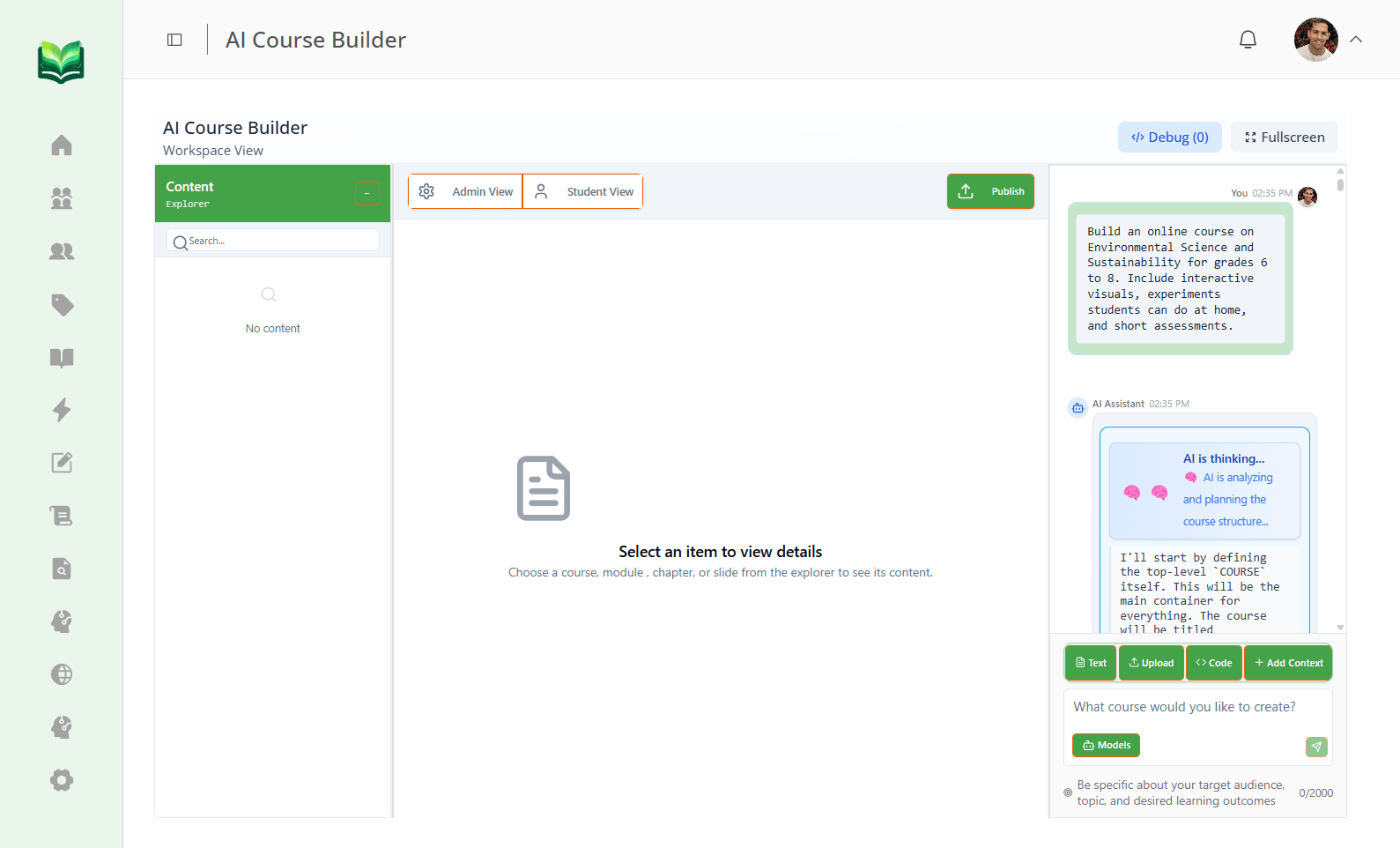
AI course creation
Type a short brief. The AI Course Builder writes an outline you can edit, then the lessons, then the videos and images. All the text stays editable, and you can swap any video for your own recording.
See how it worksCourse management and delivery
Lessons can be videos, PDFs, documents, slides, code editors or quizzes. Run the course self-paced, or add live sessions on Zoom, Google Meet or YouTube Live for a batch that starts together.
See how it worksAssessments and quizzes
Practice tests, timed mocks, exams and surveys. AI writes questions from your PDFs, slides, a topic, or an uploaded audio recording of a training call.
See how it worksLearner progress tracking
See each learner's progress, test results, and strong and weak topics. Send reports by email or WhatsApp.
See how it worksSelling, under your own brand
A course catalogue on your own domain, payments through Razorpay, UPI, Stripe or PayPal, coupons, referral links, and certificates with your logo and a QR code.
See how it worksIt also grows with you. Start with one course and a few hundred learners, then add courses, learners and teachers on the same account. For the click-by-click setup, see how to create and sell online courses using Vacademy.
Want to see your course on your own domain, with UPI payments switched on? We will set up a sample in the demo.
Start With the Talk You Give Every Week
Go back to the agency in Indore. Its first course does not need to be big. It is the 90-minute onboarding call, cut into six short lessons with a quiz after each. Clients get it free before kick-off. Anyone else pays for it.
That one course saves sixty hours a year, trains every new junior, and brings in buyers who have never heard of the agency. Your version of it is probably sitting in a shared drive right now.
Explore Vacademy for Your First Course
Build it with AI, sell it under your own brand, and see who is learning. All from one account.
Frequently Asked Questions
How can a digital company create and sell online courses?
Start with what your team already teaches clients and new hires. Pick one narrow topic for one kind of buyer, turn it into short modules with a quiz after each, put it on a course platform with a payment page, and promote it with free content, SEO and email.
Do we need a video studio to make an online course?
No. A laptop, a clear microphone and a quiet room are enough for most business courses. Screen recordings of real work often teach better than polished studio video.
How long does it take to build an online course?
It depends on the length and on how much material you already have. With an AI course builder, the outline and first drafts of the lessons take minutes. Most of the time then goes into your team checking the content and adding its own examples.
Can AI create a whole online course?
AI can draft the outline, lessons, quizzes and video scripts. Your team still decides the topic, checks every lesson and adds the client stories that no AI knows. In Vacademy, all AI-written text stays editable before you publish.
What is the best way to price an online course?
Offer more than one option. A free short course brings people in. A one-time price suits a complete program. A monthly subscription suits a library that keeps growing. Company plans suit clients who want to train a whole team.
Which payment methods can learners use on Vacademy?
Vacademy works with Razorpay, UPI, PhonePe, Google Pay, Stripe and PayPal, with invoices, receipts and currency settings for learners in other countries.
Can we sell courses under our own brand?
Yes. The Vacademy course catalogue and website builder use your colors, banners and your own domain, and certificates carry your logo and a QR code that anyone can scan to check them.