Stop Spending Weekends Creating Content
Ask any online educator what their biggest time sink is, and the answer is almost always the same: content creation. Not the teaching part — the before and after. The scripting. The recording. The editing. The uploading. The quiz-typing.
A single 20-minute lecture video can take four to six hours to produce. A quiz with 30 questions can take an entire afternoon if you're hand-typing it from an old paper. Multiply that across a full course and you've spent most of your month before a single student has even watched anything.
Vacademy's AI content suite — the Vsmart tools — was built specifically to break this cycle. You bring the expertise. The AI handles the grunt work. And the result is a full, structured course that would have taken weeks, now ready in a few hours.
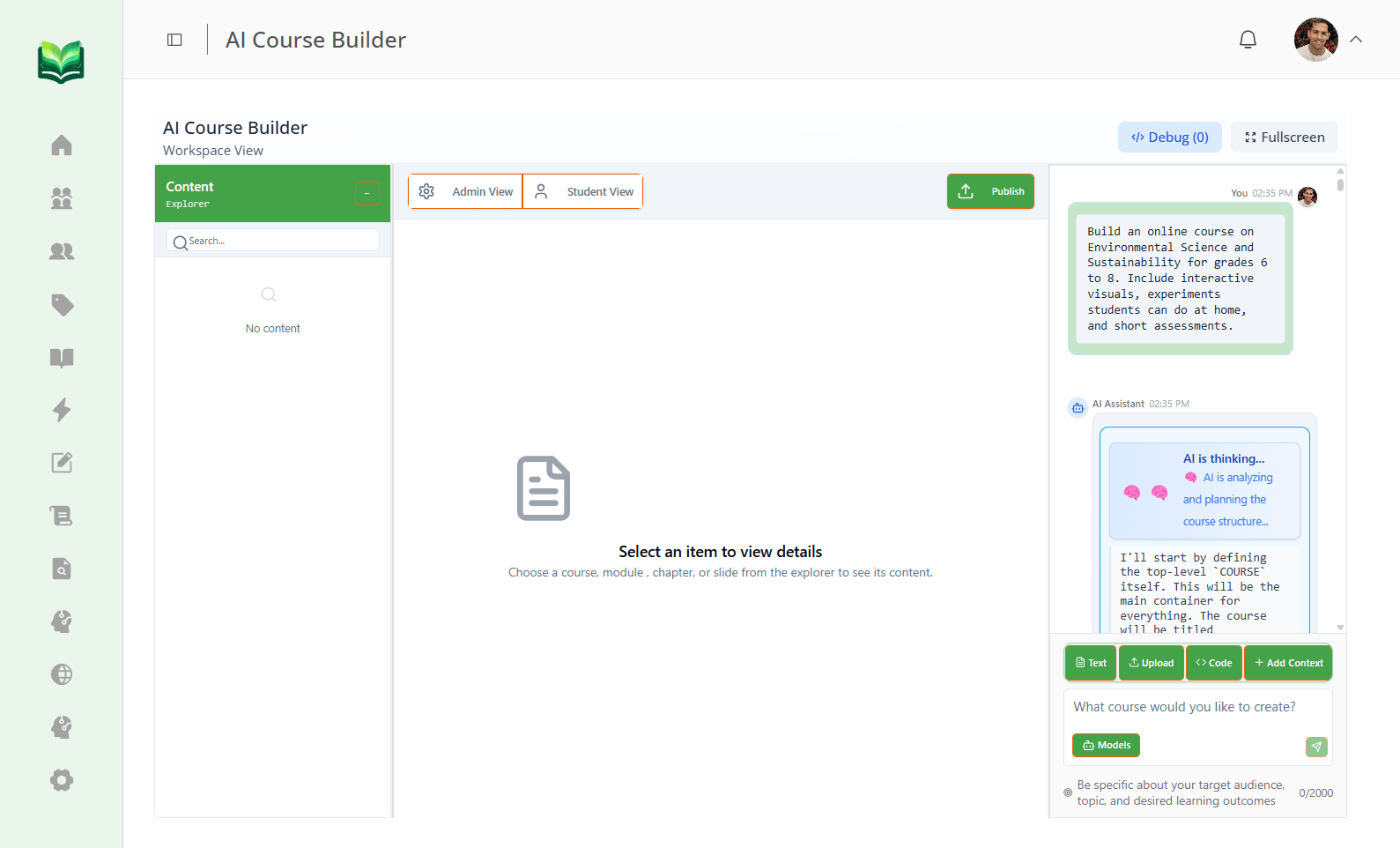
Meet Vacademy's AI Content Suite
Six tools. One platform. Every one of them designed to turn your raw ideas and existing materials into polished, interactive educational content.
Vsmart Lecturer
Enter a topic and get a fully structured lecture curriculum — outline, lesson plans, resource suggestions, all in seconds.
Vsmart Upload
Upload a PDF worksheet or question paper. The AI reads it, identifies questions, and converts everything into an interactive quiz or assessment.
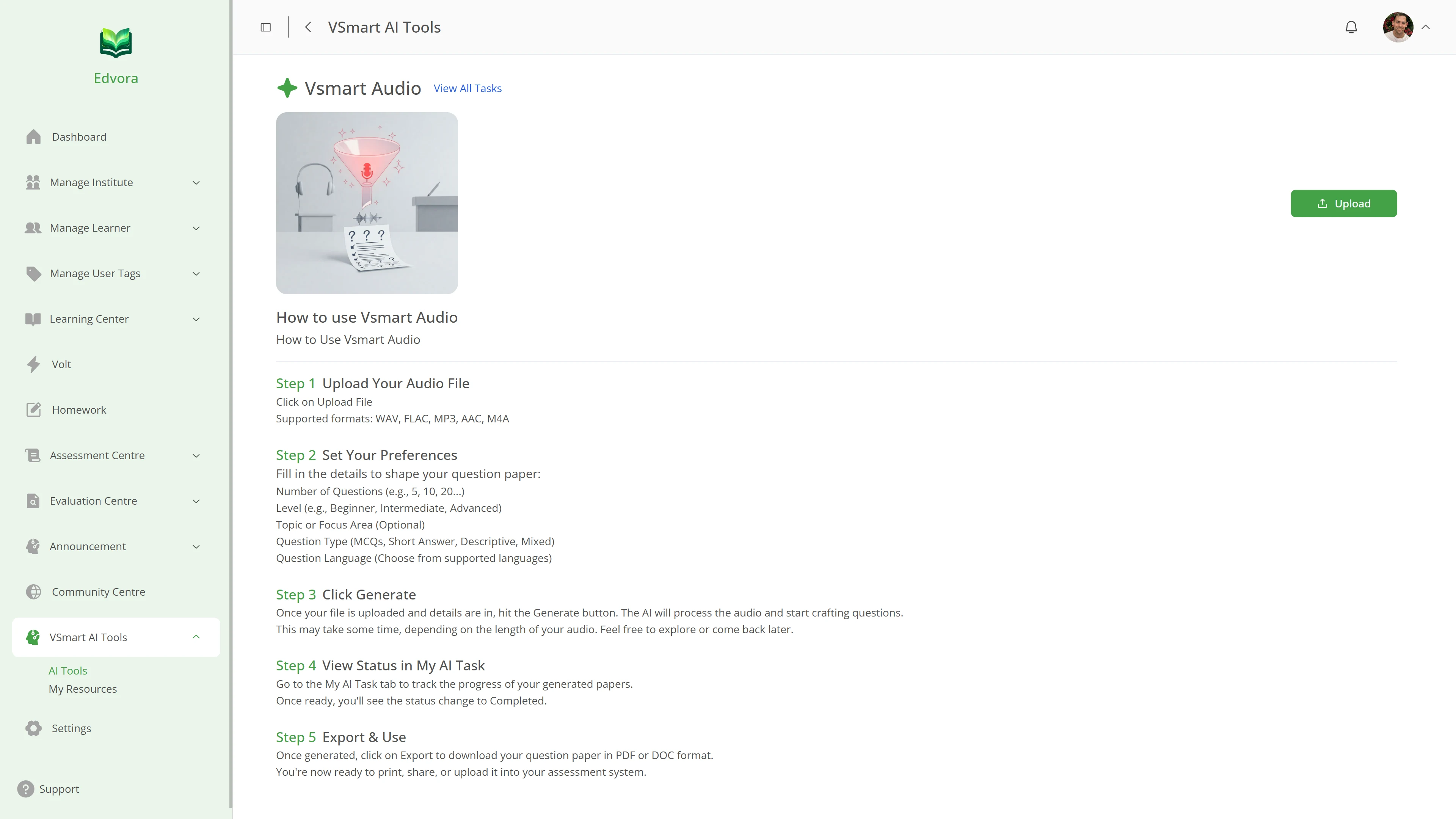
Vsmart Audio
Record a voice note or upload an audio file. Vacademy's AI transcribes it and generates questions and learning content automatically.
Vsmart Topics
Type in any topic — 'Photosynthesis', 'Indian History', 'Python loops' — and the AI instantly generates a full question bank ready to use.
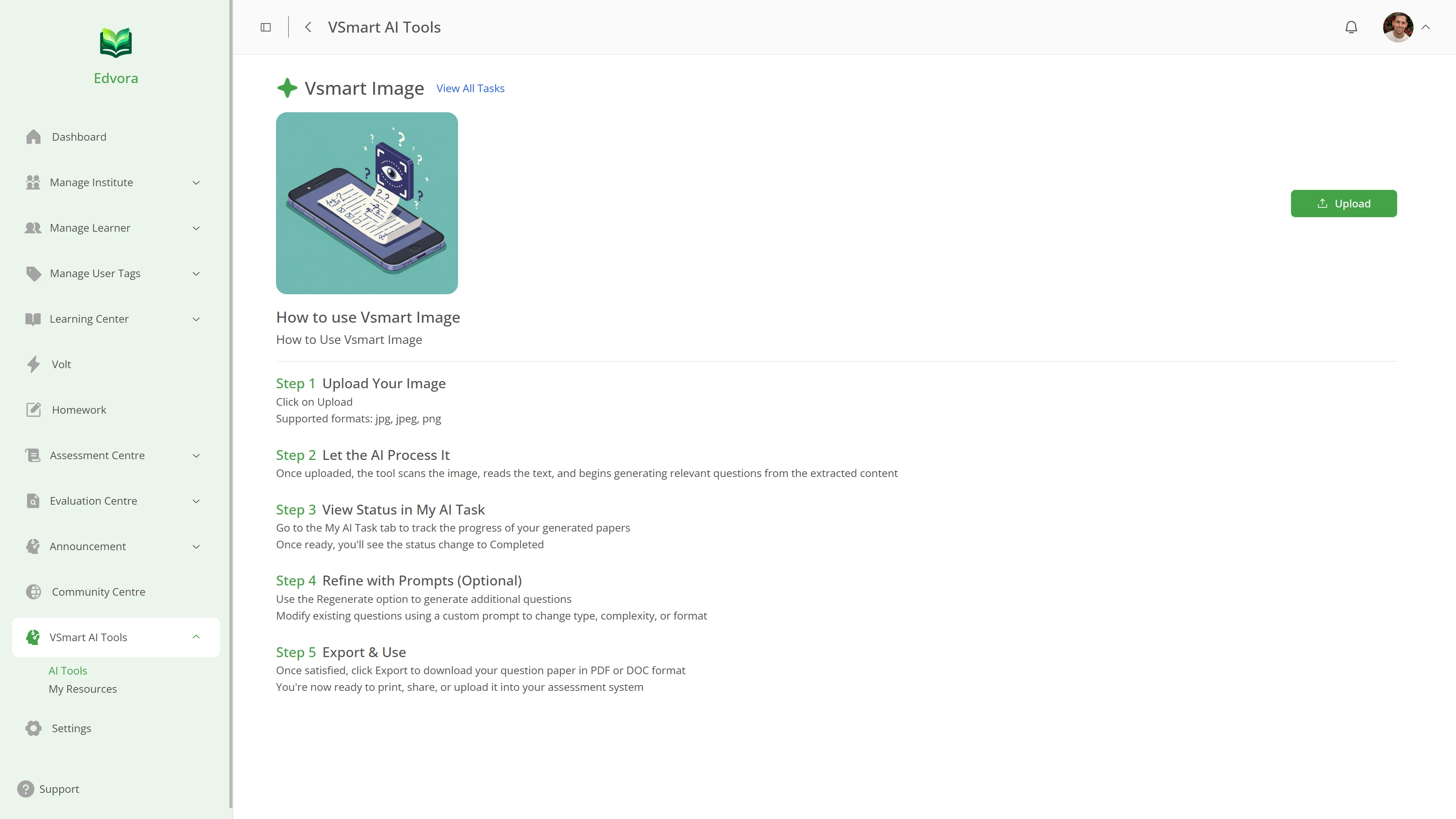
Vsmart Image
Drop in a diagram, chart, or image. The AI studies the visual and creates contextual questions around it — great for science and geography.
Volt Slides
Describe what you want to present and Volt Slides builds a polished educator-ready presentation — no PowerPoint wrestling required.
Plan a Full Lecture in 60 Seconds
Vsmart Lecturer is the closest thing to having a curriculum designer on your team. You type in a topic — say, "Quadratic Equations for Grade 10" — and the AI produces a complete lecture plan: learning objectives, a structured outline, subtopics broken into logical segments, and even resource suggestions.
What used to be a two-hour planning session becomes a 60-second prompt. The AI doesn't just dump information — it organizes it the way a good teacher would, with a logical flow from concept introduction to application to practice.
- Full curriculum outline from a single topic prompt
- Lesson-by-lesson breakdown with suggested resources
- Editable — add your own examples, adjust the pace
Upload Once, Get a Full Course
Most educators are sitting on years of handouts, worksheets, and question papers — all in PDF format, all completely static. Getting that material into a digital course platform usually means typing every question by hand. Vsmart Upload changes that entirely.
Drop your PDF in. Vacademy's computer vision reads the document, identifies questions and their answer options, and converts everything into an interactive digital assessment. A 50-question paper that would have taken hours to digitize is ready in under a minute. The same goes for worksheets, study notes, and even scanned documents.
This is particularly powerful for coaching institutes with years of archived materials. That backlog isn't a burden anymore — it's a content library waiting to go live.
Turn a Voice Recording Into a Quiz
Some of the best teaching happens spontaneously — an explanation you give during a live class, a voice note you record while commuting, a concept you talk through with a student. That knowledge usually disappears the moment the conversation ends.
With Vsmart Audio, you can record or upload any audio clip and the AI transcribes it, extracts the key concepts, and generates questions and learning content from it automatically. Your off-the-cuff explanation becomes a structured piece of course material.
It's also useful for educators who find it easier to speak than to type. Record yourself explaining a topic, and let the AI turn it into a quiz, summary, or lesson module.
Drop an Image, Get Instant Questions
Diagrams are one of the most powerful teaching tools in subjects like biology, geography, physics, and chemistry. They're also one of the hardest things to write questions around — because the question has to reference what's in the image specifically.
Vsmart Image handles this beautifully. Upload any diagram, chart, or labeled figure, and the AI analyzes the visual content and generates contextually accurate questions around it. A labeled diagram of the human heart becomes a 10-question visual assessment in seconds. A map of tectonic plates becomes a geography quiz without you writing a single question.
- Works with diagrams, charts, maps, and labeled figures
- Questions are contextually tied to the visual — not generic
- Ideal for science, geography, anatomy, and engineering subjects
How Much Time Can You Actually Save?
The numbers below aren't marketing copy. They're what educators who switched to Vacademy consistently report after their first month.
Full structured courses used to take weeks of planning and recording. Now you describe, and the AI builds.
Hand-typing quiz questions from a PDF used to eat up your evenings. Vsmart Upload does it in under a minute.
Planning a coherent lecture series used to mean days of research. Vsmart Lecturer drafts the whole thing instantly.
Updating existing content used to mean re-recording entire videos. AI-generated content is editable in seconds.
Ready to Get Your Time Back?
See exactly how Vsmart tools work for your subject and your content. A live demo takes 30 minutes and most educators leave with their first AI-generated course outline in hand.
What you walk away with:
- A live walkthrough of all Vsmart tools
- An AI-generated outline for your subject
- Answers to every setup question you have
Frequently Asked Questions
Does Vacademy generate actual videos or just content plans?
Vacademy generates structured content — lesson plans, quizzes, question banks, and course outlines — that forms the backbone of your educational videos. You can record or present over this AI-generated structure. The Vsmart Lecturer tool in particular creates full lecture curricula that make recording much faster and more focused.
Can I edit the AI-generated content?
Absolutely. Everything the AI generates is fully editable. Think of it as a very smart first draft. You review, refine, add your own examples, and publish. Most educators find they edit maybe 10–20% of what the AI produces, which is still a huge time saving.
What file formats does Vsmart Upload support?
Vsmart Upload primarily works with PDF files — the most common format for worksheets, question papers, and handouts. The AI uses computer vision to read the document, identify questions and answer choices, and convert them into interactive assessments. Support for additional formats is continuously being expanded.
Is the AI content accurate for my subject?
Vacademy's AI is built on large language models trained on broad academic content, so it handles most subjects well. That said, always review AI-generated content before publishing, especially in highly specialized or rapidly evolving fields. The AI gives you a strong starting point — your subject expertise is what makes it great.
Do I need to be tech-savvy to use Vsmart tools?
Not at all. If you can type a topic name or upload a file, you can use every Vsmart tool. The interface is designed specifically for educators, not engineers. Most first-time users get their first AI-generated quiz or lesson plan within five minutes of signing up.