For the longest time, building a quality online course meant burning weeks of nights and weekends. Outline the curriculum. Write each lesson. Record the videos. Design the quizzes. Create the worksheets. Then build it all over again every time the syllabus changed. The bottleneck was never ideas, it was the hours required to turn ideas into structured content.
AI has changed that ratio in education. Done well, it removes the grind without replacing the educator. Done badly, it produces generic content nobody trusts. Vacademy's Vsmart AI suite is built around a clear belief, the educator stays in charge, the AI does the first draft and the boring work, and the result is a course that is both faster to build and better to learn from.
Why AI Course Creation Has Finally Become Trustworthy
Generic AI text generators have been around for a while, but they have not been trustworthy enough for serious teaching. Three things have changed.
Structured Generation
Modern AI does not just produce paragraphs, it produces structured course outlines, quiz banks and lesson scripts that map cleanly to a curriculum.
Educator-in-the-Loop Design
Vsmart AI is not autopilot. It deliberately pauses for educator review at every major step, so the human voice stays in the final product.
Real Time Savings
What used to be six weeks of work is now an afternoon. That changes how often educators refresh content, launch new courses and respond to learner needs.
How Vacademy Builds a Course with AI in Four Steps
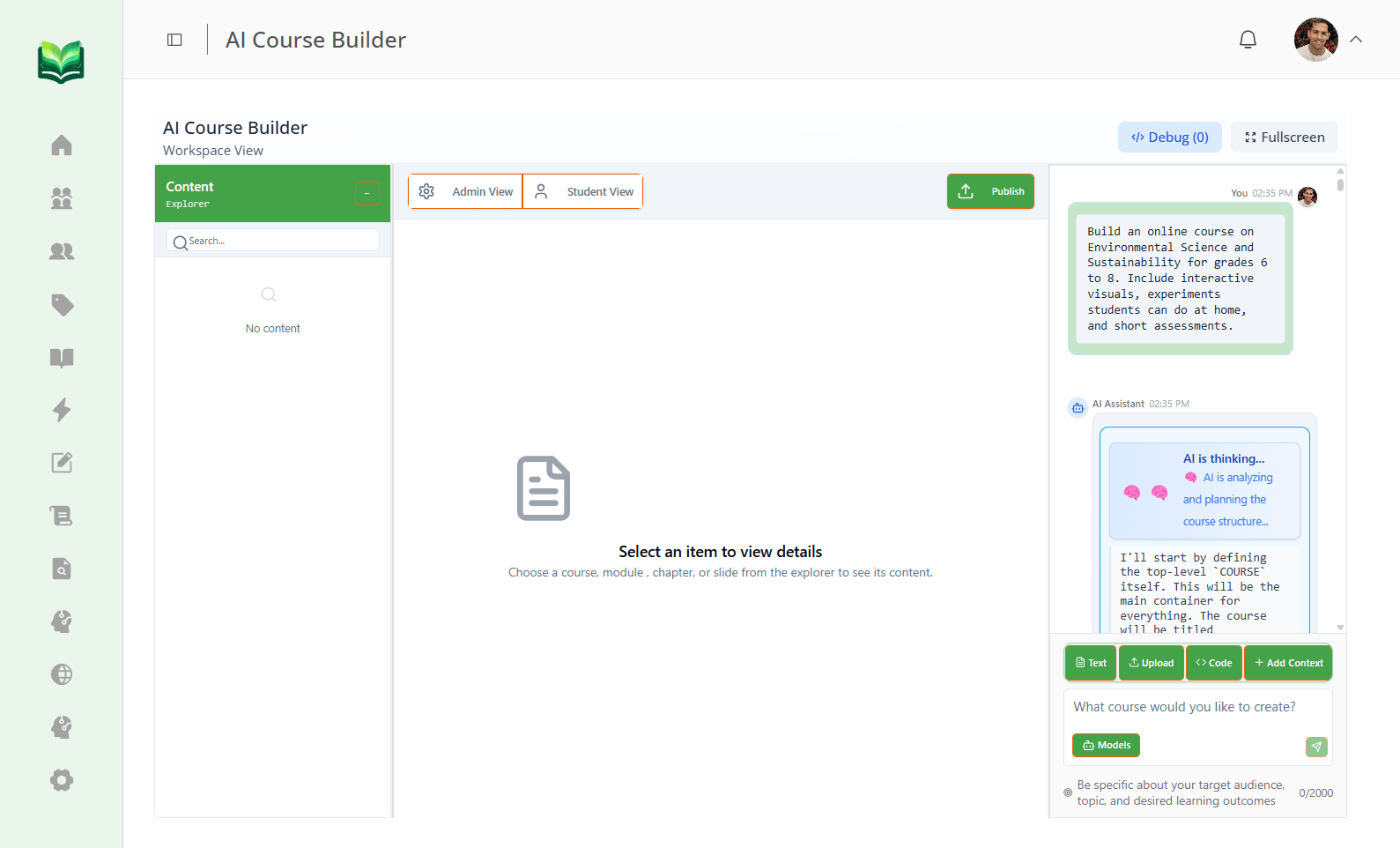
Vsmart AI follows an intentional, instructional design flow. The educator stays in control at every checkpoint.
Describe What You Want to Teach
You enter a single course prompt. Optionally add learning outcomes, audience type and skill level. This is the only mandatory input.
Approve the Course Outline
AI generates the full outline with chapter and section titles. You can edit titles, add sections or delete what you do not need before locking the structure.
Generate Lesson Content
Once the outline is approved, AI fills in lessons, scripts, code snippets, diagrams and quizzes. You can edit or regenerate any block individually.
Polish and Publish
Final review with full editorial control. Replace AI-generated videos and images with your own, refine the tone, and publish to your branded portal and mobile app.
Start From What You Already Have
Most educators are not starting from zero. You already have past syllabi, scanned question papers, slide decks and handouts. Vsmart Upload takes those documents and converts them into structured course content, complete with questions, options and answer keys when present. The years of material you built up suddenly become a launching pad instead of dead files.
A Quick Tour of the Vsmart AI Suite
The suite is designed so each tool covers a specific creation job. You pick the one that matches the input you have.
Vsmart Upload
Drop in a PDF, document or syllabus. The system extracts structure, generates questions and turns it into ready-to-edit course material.
Vsmart Audio
Speak your topic or upload an audio recording. Vsmart Audio listens and produces a structured set of questions and notes from what was said.
Vsmart Topics
Type a topic or chapter title and get a calibrated set of questions and learning checkpoints in seconds, ready to drop into a quiz or homework.
Vsmart Chat
Have a conversation with the AI about what you want to teach. It refines your prompt, suggests structure and produces content as you go.
Vsmart Image
Generate diagrams, illustrations and visual prompts that match the lesson, so learners get more than walls of text.
Vsmart Lecturer
Plan a full lecture from a topic. Vsmart Lecturer drafts the flow, talking points, examples and slides so educators walk in prepared, not panicked.
Vsmart Extract
Pull questions out of long documents, PDFs or research papers. Useful for digitising old papers and converting study material into assessments.
Vsmart Organizer
Restructure questions, lessons and modules automatically by topic, difficulty or learning outcome. The clean-up step nobody wants to do by hand.
Vsmart Feedback
Generate structured feedback on assessments and assignments at scale, so learners get useful insights instead of just a number.
From Voice Note to Question Paper
Many educators think aloud better than they write. Vsmart Audio lets you walk through a topic verbally and instantly turns it into a structured set of questions and notes. It is especially useful for STEM teachers, coaches and trainers who already explain things out loud every day, but never had a clean way to capture that into reusable assessment material.
Walk Into Class with a Real Plan
Vsmart Lecturer is the part educators tell us they love most. Type a topic and you get a full lecture plan, talking points, suggested examples and slide drafts. You can re-arrange, edit or replace any block. The result is that even a busy teacher juggling five batches walks into every class with structure instead of improvising.
Topic-Calibrated Question Banks in Seconds
With Vsmart Topics, any chapter or topic title becomes a tailored question bank. The system controls difficulty, format and learning outcome alignment, so the questions are not just random, they actually map to what you taught. This is what turns a classroom session into a measurable learning event.
Why This Becomes the New Default for Course Building
- Educators stop being content factories and become curators of the learner experience.
- Course refreshes happen continuously, not once every few years, so material stays current.
- Smaller teams and individual creators can publish at the quality of a large institution.
- Personalisation becomes practical, because generating tailored variants is no longer expensive.
- Quality and structure improve, because every course passes through the same instructional design flow.
Build Your Next Course in an Afternoon
See the Vsmart AI suite live. Bring a topic or a PDF and we will help you turn it into a publishable course inside Vacademy in a single working session.
Frequently Asked Questions
Does Vsmart AI replace the educator?
No. Vsmart AI is built as an educator co-pilot. The AI handles outlines, drafts, scripts and quiz banks, but the educator approves the structure, edits the language and decides what goes live. The voice and judgement of the teacher stays at the centre.
Can I trust the quality of AI generated questions and content?
Vsmart AI is designed around an educator-in-the-loop flow. After every step you can edit, regenerate or discard content. Most teams treat the AI output as a strong first draft, then add their own examples, anecdotes and corrections, which is much faster than starting from scratch.
What inputs work best for Vsmart AI?
Anything you already use to teach. Past PDFs and syllabi for Vsmart Upload, voice notes for Vsmart Audio, topic titles for Vsmart Topics, conversational prompts for Vsmart Chat, and full curriculum outlines for the AI Course Creator. The richer the input, the more tailored the output.
Can I use my own videos and images instead of AI generated ones?
Yes. Every AI generated asset is replaceable. You can swap in your own recordings, YouTube links, custom diagrams or branded images at any point in the workflow.
Does this work for non-academic courses like wellness or coaching?
Absolutely. Wellness coaches, corporate trainers, robotics academies and coding schools all use Vsmart AI. The flexibility of inputs, audio, text, topics, chat, makes it suitable for any kind of course where the goal is structured learning.